
Creating a calorie tracker for the Game Boy Color
I like to build things, many times not because of how useful they are, but just to see if I can. Like teaching a €20 motion sensor to count my reps, or moving an entire database between two devices with nothing but a screen and a camera. Not only because I like the challenge, but also because it’s so hard to build something that hasn’t been built before, therefore I need to go beyond what’s possible, beyond creativity, beyond the impossible, where the possible and impossible meet: the possimpible.
So I put Musclog, my open source fitness tracker, on a Game Boy Color. A real cartridge layout, battery-backed saves, 517 foods baked into the ROM, the whole thing. You can track your macros and your workouts on hardware from 1998.

160x144 pixels of pure questionable decision-making.
The tech stack
I already knew that to make a Game Boy game I needed to write code in C, and last time I did that was 19 years ago… yeah. I knew that this project would be challenging, but I also knew that with Game Boy development advances in the past years, like GB Studio and so on, there should be a nice framework where I can pair it with Claude and get a nice result, after all, the UI is simple.
Then I actually looked at GB Studio. It’s great, but it’s built for event-driven games: rooms, sprites, dialogue, triggers. Musclog is a data-entry app. Spinners, lists, progress bars, saved records. Trying to express “scroll a list of 517 foods, scale macros by grams, and write a checksummed record to cartridge SRAM” through a visual scene editor is fighting the tool the whole way. So I dropped down to plain C with GBDK-2020, the modern fork of the old Game Boy Development Kit. You write C, it compiles to a .gbc with lcc (which wraps sdcc), and you get a ROM that runs on real hardware.
No npm install. The build script downloads the toolchain, converts the logo and title art PNGs into C tile data with png2asset, compiles every src/**/*.c, and links it into a cartridge with very specific flags:
// gameboy/tools/build-gb-rom.mjs
run(
  lcc,
  [
    '-Wm-yC', // Game Boy Color only
    '-Wm-yt0x10', // MBC3 + Timer + RAM + battery
    '-Wm-ya4', // four 8 KB SRAM banks
    '-Wm-yo16', // sixteen 16 KB ROM banks (256 KB total)
    '-Wm-yn"MUSCLOG"',
    '-Wl-m', // emit the .map so I can catch bank overflows
    '-o',
    romPath,
    ...cSources,
  ],
  gameboyDir
);
That -Wm-yt0x10 picks the MBC3 mapper, the same chip Pokémon Gold/Silver used, because it has a real-time clock. I need the RTC so the cartridge knows what day it is, which matters a lot when your whole app is “what did you eat today.” The battery keeps your saves alive between power-offs. This is genuinely how the 1998 cartridges worked, and it still works now.
GBDK gives you the title and the cartridge type, but not the rest of the header, so after linking there’s a small patch step that writes the four-character game code MLOG at 0x13F, sets the mask-ROM revision byte, and recalculates both cartridge checksums. The result is CGB-MLOG-HOL-1, modelled on Nintendo’s own DMG-TR-USA scheme. Which is how I ended up designing a cartridge label for a game that will never be manufactured.
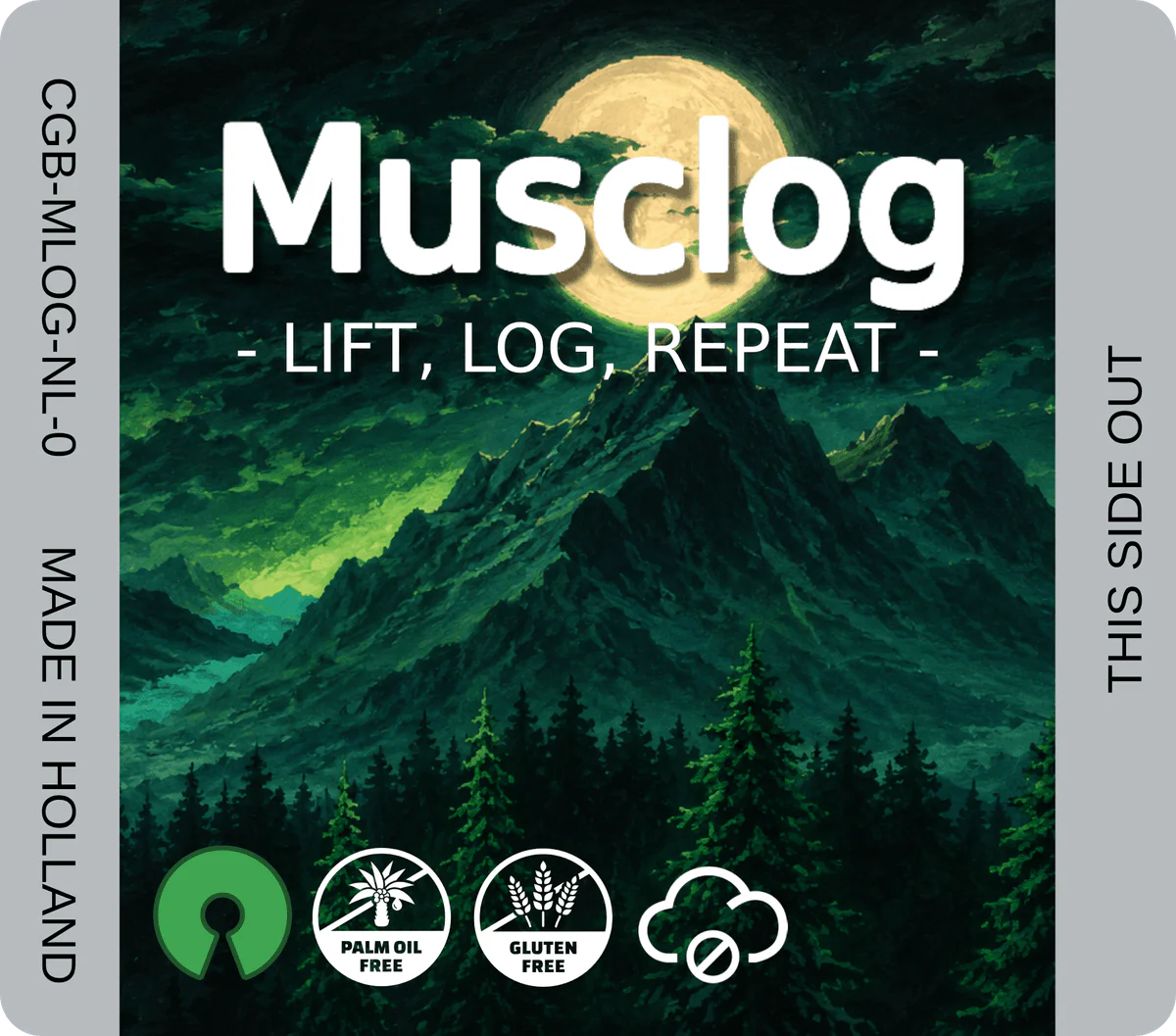
Palm oil free, gluten free, cloud free.
Pairing it with Claude was the right call, but not in the “AI writes the whole thing” sense. C with manual memory layout and ROM bank switching is exactly the kind of code where a model confidently hands you something that compiles and then silently corrupts a save three menus later. I drove, it accelerated. More on the parts where it tried to kill me later.
The scope
Musclog is a very complex app. It took me originally 8 months to build a very UGLY but functional version of it, and later on another 4 months to “refactor” / redesign it with Claude, so, you know, it’s no simple task to port it to a Game Boy. Shall we port the AI chatbot? What about AI photo estimation? Should I allow users to add their own exercises? Custom foods? What about fetching food from USDA or Open Food Facts?
Yeah, it’s complex. So first I had to decide on the scope, and to be honest some of the things I mentioned above are of course unportable. There’s no way to scan a barcode because the Game Boy has no camera, and there’s no internet so forget about AI or fetching food from USDA or Open Food Facts, although there was a guy who ran a tiny LLM on a Game Boy.
So I cut it down to the parts that actually make sense on a cartridge:
- A title screen with
NEW GAME/CONTINUE/OPTIONS, a soundtrack, and a blip on every button press - First-run onboarding that generates your calorie and macro goals
- A daily macro dashboard (calories, protein, digestible carbs, fat, fiber against goals)
- Food logging with date selection, search, serving sizes, and delete
- 517 bundled foods (215 USDA foundation foods plus 302 common foods) compiled into the ROM
- Up to 100 custom foods you create on the cart
- Body-weight tracking with a trend chart
- Free workout sessions with muscle filtering, suggested weights, editable sets, and a 60-second rest timer
- 100 bundled exercises across 8 muscle groups
- A progress dashboard with charts
- Settings to re-edit everything, plus a reset
The neat part: the foods and exercises come from the exact same data/*.json files the React Native app uses. A Node script ports them into hardcoded, ROM-banked C tables, so the cartridge and the phone app share one source of truth. Change the dataset, re-run npm run gb:gen-foods, rebuild.
// gameboy/tools/gen-exercises.mjs
// Source: data/exercisesData.json -> exercises.{c,h} (bank 6)
// Muscle groups, equipment types, and mechanic types are emitted as compact
// uint8 enum values. Load multipliers are stored as centi-units (1.45 -> 145).
Since I first wrote about this, the app’s exercise catalogue was replaced wholesale with an 873-entry import from free-exercise-db, which is public domain. 873 exercises do not fit on a cartridge and nobody wants to scroll them with a D-pad anyway, so the generator now takes only the 100 rows flagged isPopular and assigns them compact cartridge IDs from 1 to 100.
The title screen
The cartridge boots into the splash, then into an actual title screen: full-screen art with NEW GAME, CONTINUE once a completed save exists, and OPTIONS. Picking NEW GAME over an existing save asks for confirmation first, because erasing someone’s six months of logs on a mis-tapped D-pad is a bad look.

The constraint here is tiles, not pixels. The Game Boy draws backgrounds from a tile map, and the background tile indices only go up to 256. png2asset dedupes identical and flipped tiles, so a picture only fits if it’s repetitive enough to compress into that budget — every extra bit of detail in the sky costs you a unique tile. The build fails outright if a new gb_background.png is too detailed, which is a very fast feedback loop for “you got greedy with the gradient.”
The art and the code that draws it are both pinned to ROM bank 8, so start_screen.c reads the tile data co-located in its own bank without a single SWITCH_ROM() call.
Sound
There’s a soundtrack, and a short blip on every selection, confirm, and back press. Both can be toggled independently in OPTIONS, and those two flags live in SRAM and deliberately survive a NEW GAME erase — if you turned the music off, you meant it.
The Game Boy cannot play MIDI. It has four hardware channels: two pulse waves, one programmable wave, one noise generator. So the build step takes the bundled .mid files and reduces them at build time to exactly that: SFX on pulse 1, and the soundtrack arranged as pulse lead, wave bass, and noise drums, emitted as a C table of APU register writes. The converter lives under gameboy/tools/music/ and has its own node:test coverage, because a MIDI parser is precisely the kind of thing that works on one file and then silently transposes another one down an octave.
The bug I did not anticipate: heavy screen transitions and tile loading can starve the sequencer, and a Game Boy channel that stops receiving updates does not go quiet, it just holds its last note forever. So there’s a VBlank interrupt handler that watches a stall counter reset by the sequencer each frame and kills channels 2, 3, and 4 after two frames without a tick. Two frames of silence is imperceptible. An indefinitely sustained square wave while you scroll a food list is not.
Onboarding
The first time you boot the cartridge there’s no save, so it walks you through unit system, biological sex, activity level, age, height, weight, lifting experience, fitness focus, and weight goal. Same questions the phone app asks, just driven by the D-pad instead of touch. Every value is a spinner: up/down changes it, left/right jumps faster.
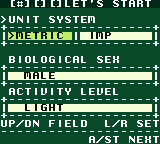
Then it generates your macro targets from that profile and lets you review and edit them before saving.
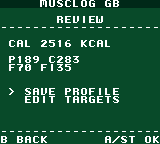
Here’s where the constraints get fun. On a phone, a user profile is a row in a database and you never think about its size. On the cartridge, the entire profile, all nine answers plus five macro goals plus the RTC calibration, is packed into 23 bytes of SRAM. Booleans and small enums get bit-packed into single bytes:
// gameboy/src/data/profile.c
raw[SRAM_FLAGS1] = (uint8_t)(((data->units & 1u) << FLAGS1_UNITS_BIT) |
                             ((data->gender & 3u) << FLAGS1_GENDER_SHIFT) |
                             (((data->activity_level - 1u) & 7u) << FLAGS1_ACTIVITY_SHIFT) |
                             ((data->lifting_experience & 3u) << FLAGS1_EXPERIENCE_SHIFT));
One byte holds four answers. Units is one bit, gender is two bits (three options), activity level is three bits, experience is two bits. Reading it back is the same thing in reverse with shifts and masks. There’s no JSON, no key-value store, no ORM. Just bytes at fixed offsets, and a 16-bit checksum at the end so a half-written save from a yanked cartridge gets detected and reset instead of read as garbage.
Storage is always metric, by the way, exactly like the main app. Kilograms in tenths, centimeters as whole numbers. If you picked imperial, the conversion happens at the UI boundary when you enter or display a value, never in storage. I learned that lesson the expensive way on the phone app and I was not going to relearn it on a Game Boy.
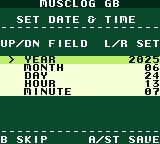
The dates are powered by the MBC3 real-time clock. When you set the clock during onboarding it stores a base date and zeroes the RTC’s day counter, then “today” is just the base date advanced by however many days the clock has ticked since. If you never set it, everything falls back to 2026-01-01, which is wrong but at least it’s deterministically wrong.
Nutrition
This is the core loop. Pick a date, search a food, set the serving in grams or ounces, log it. The home screen shows the day’s totals against your goals with little progress bars, the same five macros as the app.
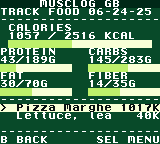
The 517 foods live in ROM banks 2 and 3, not in SRAM. They’re read-only reference data so they belong in the cartridge’s program space, and at roughly 16 KB per bank you have to actually budget for them. Each food stores energy as whole kilocalories and macros as decigrams (tenths of a gram), because the Game Boy has no floating point. None. There’s no FPU, and software floats are slow and bloated, so the entire app is integer math with fixed scaling.
When you log “85 grams of chicken breast,” the food log doesn’t store the macros at all. It stores a 6-byte record of { day_number, food_index, grams } and recomputes the macros on demand by scaling the per-100g values:
// gameboy/src/data/foodlog.c
void foodlog_scale(const FoodCache *fc, uint16_t grams, uint16_t *cal, uint16_t *pro,
                   uint16_t *carb, uint16_t *fat, uint16_t *fib) NONBANKED {
    *cal  = (uint16_t)(((uint32_t)fc->kcal * grams + 50u) / 100u);
    *pro  = (uint16_t)(((uint32_t)fc->protein_dg * grams + 500u) / 1000u);
    *carb = (uint16_t)(((uint32_t)fc->carbs_dg * grams + 500u) / 1000u);
    *fat  = (uint16_t)(((uint32_t)fc->fat_dg * grams + 500u) / 1000u);
    *fib  = (uint16_t)(((uint32_t)fc->fiber_dg * grams + 500u) / 1000u);
}
The + 50 and + 500 are rounding done with integers: add half the divisor before dividing so you round to nearest instead of always truncating down. The uint32_t cast matters too, because kcal * grams overflows a 16-bit register fast and the Game Boy’s CPU is natively 8-bit. Get the cast wrong and a big portion of cereal silently wraps around to a small number, which is the kind of bug that’s very funny until it’s your bug.
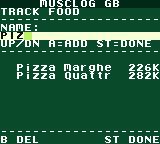
Custom foods are the one writable food source. You can create up to 100 of them (name plus per-100g macros), stored in their own SRAM bank, and they show up first in search marked with a *. The clever-ugly detail: deleting a custom food never compacts the slots. It just clears the name and keeps the slot stable, because old food-log records point at foods by index, and if I shuffled the slots after a delete, every historical log would suddenly point at the wrong food. Tombstones instead of compaction. Boring, correct, done.
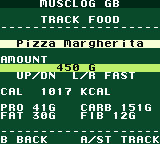
The carbs convention is the same one I obsess over in the main app: bundled food carbs include fiber (US label style), but the progress bar shows digestible carbs (carbs - fiber) against your goal, so fiber doesn’t get double-counted. Yes, I ported that nitpick to the Game Boy too. If you’re going to do a thing, do the thing.
Workouts
Free sessions: pick an exercise, optionally filter by muscle group with left/right, get a suggested starting weight, then edit sets, weight, and reps. There’s a 60-second rest timer because of course there is.
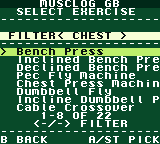
The 100 exercises live in ROM bank 6 as a generated table. Completed workouts get written to SRAM bank 2 as a variable-length record: a small header plus one 4-byte row per set. Exercise names aren’t stored, just an index into the ROM table, same trick as the foods.
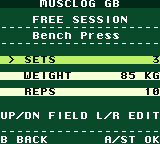
Volume is where the integer math earns its keep. The first version of this just summed raw tonnage — weight * reps, clamped so a maniac doing 65,535 kg doesn’t overflow the counter — and I wrote at the time that the phone app’s real model was overkill for a cartridge. The phone app averages seven different one-rep-max formulas (Epley, Brzycki, Lander, Lombardi, Mayhew, O’Connor, Wathen) to score a set, and there is no world in which a CPU with no FPU evaluates seven of those per set.
Then I realised I didn’t have to evaluate them at all. Those formulas only depend on the rep count, so their average is just a multiplier per rep count, and rep counts are integers from 1 to 30. So it’s a 30-entry lookup table, computed once, stored as hundredths:
// gameboy/src/features/workouts/volume_calc.h
static const uint16_t avg_1rm_factor_centi[30] = {
    102, 105, 108, 111, 114, 117, 120, 122, 125, 128, /* R= 1-10 */
    131, 135, 138, 141, 144, 148, 152, 156, 160, 165, /* R=11-20 */
    170, 176, 182, 189, 196, 205, 215, 227, 242, 260  /* R=21-30 */
};

static uint16_t set_volume_1rm_kg(uint16_t weight_kg_tenths, uint8_t reps) {
    uint8_t r;
    uint32_t vol;

    if (reps == 0u || weight_kg_tenths == 0u) return 0u;
    r = reps > 30u ? 30u : reps;
    vol = ((uint32_t)weight_kg_tenths * avg_1rm_factor_centi[r - 1u] + 500u) / 1000u;

    return vol > 65535u ? 65535u : (uint16_t)vol;
}
60 bytes of ROM and one multiply, and the cartridge now reports the same volume number as the phone. This is my favourite kind of optimization: not making the slow thing fast, but noticing that the expensive part was constant the whole time.
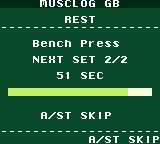
Progress
Charts on a 160x144 screen with no graphics library and no floats.
It’s a paged dashboard over a rolling 7-day or 30-day window. Up/down toggles the window, left/right cycles pages: a summary (distinct muscle groups hit, workout count, days logged, average daily macros), then per-day bar charts for calories, protein, carbs, and fat, then a body-weight trend.
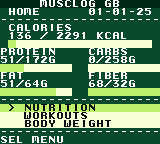
There’s no canvas. The “chart” is whole background tiles colored with palette attributes, the exact same primitive the progress bars use. A bar is just a rectangle of filled tiles. To draw the daily calorie chart I compute a per-day total, find the max, and scale each day’s height to the 9-row plot area with integer math:
// gameboy/src/app/progress.c
for (b = 0u; b != n_bars; ++b) {
    v = bucket_avg(vals, len, b, n_bars);
    h = (uint8_t)(((uint32_t)v * PLOT_ROWS + (max >> 1u)) / max);
    if (v != 0u && h == 0u) h = 1u;      // never hide a non-zero day
    if (h > PLOT_ROWS) h = PLOT_ROWS;
    if (h == 0u) continue;
    x = (uint8_t)(x0 + b * bar_w);
    top = (uint8_t)(PLOT_BASE + 1u - h);
    ui_fill_attr(x, top, bar_w, h, UI_PAL_SELECTED); // paint the column
}
The 30-day window is the interesting bit. The plot is 18 tiles wide and 30 days don’t fit, so it buckets the days down to 18 columns and averages each bucket. 7 days get fatter 2-tile bars, 30 days get thin 1-tile bars. Same code path, different bar_w. The “average daily calories” on the summary page deliberately divides by days you actually logged food, not by the full 7 or 30, otherwise a couple of lazy days drag the number down and it stops meaning anything.
The body-weight trend needed its own version of that loop. Calories start at zero, so scaling against the max is fine; body weight does not, and normalising 82.1–83.4 kg against a max of 83.4 gives you five identical full-height bars. So the weight chart normalises over min…max instead, and the lightest weigh-in keeps a 1-tile base so it doesn’t vanish.
Aggregating it is cheap because the food log is tiny. For each day in the window I sum that day’s entries once, fill four parallel arrays (calories, protein, digestible carbs, fat), and every chart page reads from those without rescanning. The whole thing renders in well under a second on hardware that runs at roughly 1 MHz.
I wrote a host-side test for the bucketing and bar-height math before ever touching the emulator, because debugging integer overflow by squinting at a Game Boy screen is not a life I want.
Settings
The Select button opens a menu, and Settings lets you re-edit every profile field and all your macro targets after onboarding, change units, and there’s a confirmation-gated Reset Data option for when you want a clean slate. There’s also an About screen that points at musclog.app, because the cartridge is a gimmick and the real app is on your phone.
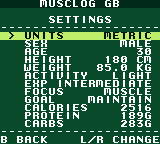
Nothing exciting, which is the point. Onboarding asks you nine questions once; Settings is the promise that none of those answers are permanent.
Other challenges
The thing that almost ended the project was running out of space in the wrong place. The Game Boy splits ROM into 16 KB banks, and bank 0 is special: it’s always mapped, so all the shared code and helpers live there, and it can’t be paged out. When I finished the progress screen and ran the build, bank 0 was at 16,093 bytes out of 16,384. 291 bytes free. Not kilobytes. Bytes.
So the whole progress screen had to go into a numbered, paged bank, and the home loop calls into it through a banked function trampoline that swaps the active ROM bank and restores it on return. Then the title screen and the audio driver needed to land somewhere too, so the cartridge grew from 128 KB to 256 KB and the persistent food-log operations got evicted from bank 0 as well. The layout:
Bank layout: ROM_0 uses 14880 / 16384 bytes
Bank layout: _CODE_2 uses 9591 / 16384 bytes     (USDA foundation foods)
Bank layout: _CODE_6 uses 2893 / 16384 bytes     (exercise table)
Bank layout: _CODE_8 uses 6266 / 16384 bytes     (title screen + art)
Bank layout: _CODE_9 uses 6627 / 16384 bytes     (audio driver + APU data)
1,504 bytes free in bank 0 now, which after the 291-byte era feels like a mansion. The build script parses the linker map and fails the build if any bank overflows, because a ROM that overflows a bank doesn’t error, it just maps the wrong code in and crashes when you walk into that menu. Ask me how I learned that.
The other recurring tax is that there’s no malloc. No heap, basically. Everything is static buffers and stack, and the stack is small, so you don’t get to casually declare a 256-byte array inside a function. The workout set scanner for the progress screen uses a fixed static buffer and caps how many sets it reads, because the alternative is blowing the stack and corrupting whatever’s next to it.
And this is where Claude and I disagreed most. An LLM has read a million heap-allocating, float-using, malloc-happy C tutorials, so its instinct is to write that C. On a Game Boy that C is a slow-motion crash. A lot of the work was catching “this looks right” code that would have quietly stepped on an unlinked SRAM bank or overflowed a uint16_t. The model is a fantastic accelerator and a terrible substitute for understanding the hardware. Both things are true.
The thing that helped most was making the machine check the machine. There’s clang-tidy and clang-format wired up over the C sources against stub GBDK headers, the linker map check fails the build on bank overflow, and the parts with real algorithms — the MIDI arrangement reducer, the chart bucketing — have host-side tests that run in Node instead of on a 1 MHz CPU I can’t set a breakpoint in.
19 years between C sessions, and the language was the easy part. The platform was the teacher.
Creating the webpage
A cartridge nobody can run is a screenshot, not a project. So the Musclog website has a /gameboy page that boots the actual ROM in your browser through WasmBoy, a Game Boy emulator compiled to WebAssembly. Keyboard controls on desktop, on-screen touch buttons on mobile.
// app/(website)/gameboy.web.tsx
const { WasmBoy } = await import('wasmboy');
await WasmBoy.config(canvasRef.current, { isGbcEnabled: true, ... });
await WasmBoy.loadROM(rom);
The fun problem is saves. A Game Boy battery save is just the cartridge’s SRAM image, and WasmBoy persists it to IndexedDB. So I flush it on an interval and when you leave the page, and on the next load it comes right back. Your in-browser weigh-ins survive a refresh.
Which brings up the one piece of tooling I haven’t mentioned. Somewhere in the middle of all this I wrote a decoder that reads a cartridge’s SRAM image back into JavaScript objects, mirroring the exact byte layouts from the C firmware. It started as debugging equipment — being able to print what the cartridge thinks it stored beats staring at a hex dump and counting offsets on your fingers — and on the website it turned out to be far more useful pointed the other way.
There’s no real-time clock in a browser tab, so a web player would otherwise be stuck setting the date by hand on a virtual cartridge. Instead the page now writes a valid profile block into the save before the ROM boots, complete with a matching checksum, handing the cartridge today’s real date. The hour and minute ride along in two extra bytes that sit just outside the checksummed region, so the picker can pre-fill the time too without touching the save format.
It is a save file forged by a webpage, and the firmware cannot tell. Which felt like a slightly illicit thing to be able to do to my own cartridge, and it is the sort of trick that turns out to matter later.
There’s also a PDF instruction manual, generated from a script and linked on that page, because if you’re going to do a fake cartridge you may as well do a fake manual.
Conclusion
The thing that surprised me wasn’t C. It was how much modern app development hides from you. On the phone I never think about bytes, banks, or whether a multiply overflows. On the cartridge that’s the entire job, and there’s something clarifying about a platform that refuses to let you be sloppy. 291 free bytes is a very honest code reviewer.
What I did not expect was that the cartridge would end up teaching the phone app something. The seven-formula volume model became a 30-entry lookup table because the Game Boy couldn’t afford the multiplications, and it turns out the phone couldn’t really justify them either. Constraints kept turning into simplifications that were just… better.
It’s also a genuinely good way to understand the hardware that raised me. I grew up on this thing. Now I can confess to it how many grams of chicken I ate, which is either the most or least productive use of a Game Boy Color ever shipped, and I refuse to decide which.
The ROM, the build scripts, and the firmware are all open source in the same repo as the app: github.com/blopa/musclog-app, under gameboy/. If you want to actually mash the buttons without building anything, it runs in your browser at musclog.app/gameboy. Bring your own greek yogurt.
What’s next?
A cartridge that only exists as a .gbc file is still, if I’m honest, a screenshot with extra steps.
Everything around it is already finished. The label is designed. The manual is written and typeset. The header says CGB-MLOG-HOL-1 as if it came off a production line in Holland in 1998. The only missing part is the plastic.
So the next step is an actual object: an MBC3 board with the battery and the real-time clock populated, the ROM flashed onto it, the label printed and trimmed badly by me with a craft knife, and the whole thing in a Game Boy Color on a train. It will be worse than the emulator on this website in every measurable way — dimmer, slower to boot, and the RTC will quietly drain that coin cell for as long as I own it, which is precisely what killed everyone’s Pokémon Gold saves.
That is the version I want anyway. The entire premise was to build it the way it would have been built, and the way it would have been built ends in something you can drop on the floor.
Lift, Log, Repeat. On a cartridge now.
See you in the next one!
