Now you can tokenmaxxing with Musclog
For a while, Musclog had one switch for how hard its AI should work: Use thinking mode, on or off. On made every request think harder, and it changed how a meal estimate was built: first read the recipe, then check each food against your database, then estimate only what is left.
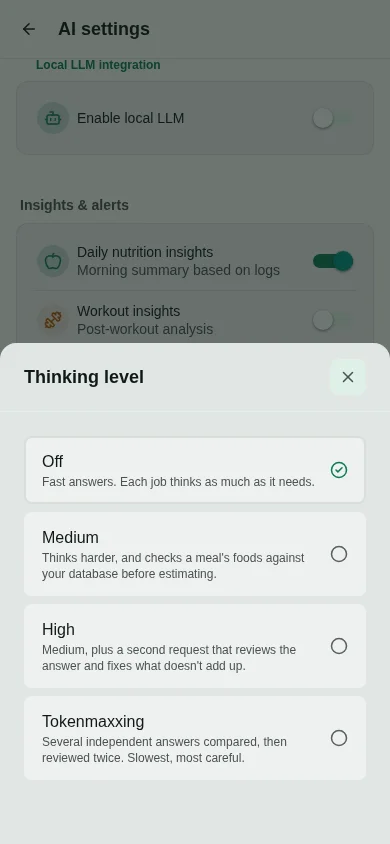
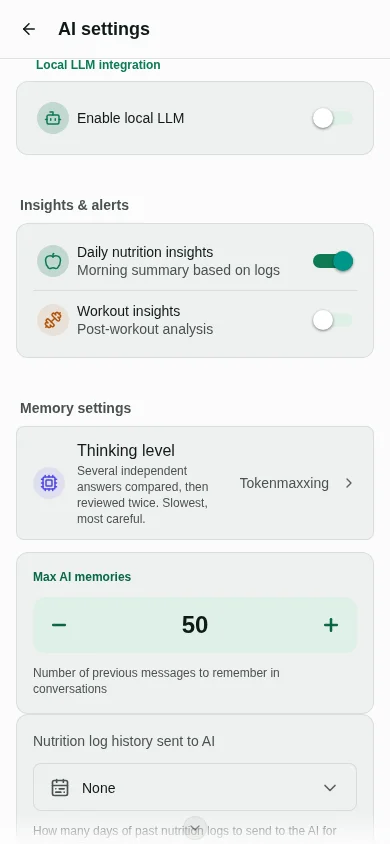
That switch is now four levels: Off, Medium, High and Tokenmaxxing. Off and Medium are exactly the old off and on. High and Tokenmaxxing are new, and they do not just ask the model to think harder. They make Musclog ask more than once and check the answers against each other, with code, not the model, deciding which answer wins.
What each level does
Off is fast. Each kind of job thinks as much as it needs: reading a meal or a nutrition label thinks the least, a chat reply a little more, and an analysis of weeks of your data or a workout plan the most.
Medium is the old thinking mode. A chat reply, an analysis of your data and a plan reason at the highest regular effort (reading a meal, a label or an import at a middle one), and meal estimates take the careful path: the model first lists the foods and grams, Musclog checks every food it claims to recognise against your own foods, looks the others up by name in your foods, and only what is still left is estimated.
High is Medium plus a second look at almost everything:
- Meals get a review. The model is shown its own estimate next to your description or photo and asked what is missing (the cooking oil, the dressing, the drink) and which portions look wrong. Anything it adds is estimated and checked like the rest.
- Coach insights (your weekly nutrition, a workout you just finished, a meal critique) get a fact check. Musclog lists every number in the answer that does not appear in the data it was given, and asks for a corrected version. A correct average or total can stay; a number from nowhere should go.
- Workout and meal plans get a critique. Code first checks what code can check: an exercise listed twice in one workout, sets or reps that make no sense, a day of a meal plan more than 10% off the calories or protein you asked for. The model gets that list and the plan, and returns a corrected plan.
- Nutrition labels and imported workouts or food logs are read twice. Where the two readings agree, that is the answer. Where they disagree, one more request reads the input again, told which fields were disputed.
Tokenmaxxing is High, turned up:
- Meals start with a first look. Before anything is estimated, the model describes the scene in a sentence or two, the way a person would: “A hand holding a regular-size dinner plate with rice and curry, taken at a restaurant, from above.” It also notes where the meal was served (restaurant portions are often bigger than home ones), what the food is on and how big that is (a regular dinner plate is about 26 cm), what in the picture shows the scale (a fork, a hand, a can), and then each food with how much of the plate it fills. No weights, only the context that makes a weight guess better. The first look feeds two independent estimates. If those two agree with each other and the look flags nothing as unsure, the estimate stops there. Otherwise a second look is taken, with two estimates of its own, so up to four in all. An ingredient stays if at least half of the estimates found it, whichever look they came from, so a cooking oil one look missed is not lost, and its grams and macros are the median of what those estimates said. Then come up to two rounds of review, which stop as soon as a round changes nothing. The photo is still sent with every estimate, so a wrong first look can be corrected by looking again.
- Insights and plans get two rounds of review instead of one; the second fact-check round also tightens the wording.
- Labels and imports are read twice, and a third time only if the first two disagree. Each field is settled by majority or median. Only a field none of the readings agree on goes back to the model.
- The coach writes every chat reply twice. It drafts an answer you never see, then runs it through a short checklist against your conversation and your app data (a number that contradicts your data, a claim about you that nothing supports, a safety topic such as pain, an eating-disorder sign, an extreme deficit, pregnancy or medication, and whether it answers what you asked), and the checked version is the one that appears. A draft that passes every check comes back unchanged. While it does, the chat says “Double-checking my answer…”.
Every request, one by one
First, what these requests are not: there are no tools, no function calling and no agent loops. Every request is a plain question to the model, answered as text or as JSON in a fixed shape. The model never decides to call something or to go around again. Musclog’s code decides, and every loop has a fixed limit: a level can never make a job run forever.
This is how many requests each job makes with a cloud model or your own key (the “+” parts only happen when they are needed):
| What you do | Off | Medium | High | Tokenmaxxing |
|---|---|---|---|---|
| Track a meal (text or photo): the camera, My Meals, “Track meal” in the coach | 1, +1 for foods your database did not match, +1 for numbers that cannot be true | read the recipe, estimate what your database did not match, recheck: usually 2 to 3 | the Medium steps, then 1 review (+1 for what it added, +1 recheck) | up to 2 first looks, then the Medium steps up to 4 times (2 per look), then up to 2 reviews (each +1 for additions, +1 recheck) |
| Read a nutrition label (photo or text) | 1 | 1 | 2 readings, +1 only if they disagree | 2 readings, a third if they disagree, +1 only if still disputed |
| Import workouts, a food log or a past day written in words | 1 | 1 | 2 readings, +1 only if they disagree | 2 readings, a third if they disagree, +1 only if still disputed |
| Chat with the coach | 1 | 1 | 1 | 2: an unseen draft, then the reviewed reply you read |
| Coach insights: progress analysis, nutrition check, meal critique, feedback on a finished workout | 1 | 1 | the answer, then 1 fact check | the answer, then up to 2 fact checks |
| Workout plan or meal plan | 1 | 1 | the plan, then 1 critique | the plan, then up to 2 critiques |
| The daily insights Musclog prepares in the background | 1 | 1 | 1 (never above Medium) | 1 (never above Medium) |
| The AI setup chat in onboarding | 1 per message | 1 per message | 1 per message | 1 per message |
A few details the table hides:
- A review round can stop early. If a review does not improve the answer, or fails, Musclog keeps the answer it had and does not ask again.
- Tokenmaxxing stops sooner when its first answers agree. The counts in the table are the most it makes, not a fixed number: a label or import that two readings agree on is done after two, a meal whose first look is settled after its first two estimates.
- The meal numbers are per meal. A photo with two meals in it gets a review for each.
- The first looks are separate requests on purpose. If one shared look fed every estimate, a mistake in it (a missed sauce, a misjudged portion) would reach all of them and the vote would hide it. The second look is only taken when the first one’s estimates disagree or the look flags doubt. If a look fails, the estimate goes on with the other; if no look reads at all, it falls back to plain estimates.
- The estimates of one stage run together on a cloud model, but one after another on your phone or a local server, because those have one engine that answers one request at a time.
- The AI setup chat only gets the reasoning effort. It makes no extra requests at any level.
- On the phone, the meal photo is its own path. It is read once, twice or three times (Off and Medium, High, Tokenmaxxing), matched to your foods, and what is left is estimated. It has no first look and no review round: a small model asked to describe a photo in detail is more likely to invent details.
The other half of a level is how hard each request thinks (the provider’s own reasoning setting, where it has one):
| Kind of request | Off | Medium | High | Tokenmaxxing |
|---|---|---|---|---|
| Reading a meal, a label or an import into fixed fields | minimal | medium | medium | high |
| A chat reply | low | high | high | max |
| An analysis of your data, a workout plan or a meal plan | medium | high | high | max |
This is why Medium and High feel similar per request: both ask for the same effort. High differs in how many requests it makes, not in how hard each one thinks. Reading is the one kind of request that never gets the maximum, at any level: Tokenmaxxing spends its extra on more readings that are compared, not on more thinking per reading.
Code decides, not the model
The rule behind every extra request is the same: a second answer only replaces the first one if code says it is no worse. A meal review is kept only if it does not add numbers that cannot be true (more protein than the food weighs, energy that does not match the macros). A plan revision is kept only if it has no more problems than the plan it replaces. A fact-checked insight is kept only if it has no more numbers that are not in your data.
And an extra request can only make an answer better, never break it. If a review fails, times out or comes back empty, you get the answer from before the review. Only pressing Cancel stops everything.
What it costs
More requests mean more waiting, and on some providers more money. Roughly:
- A meal estimate at Off is one request, plus one or two more only when something is wrong.
- At Medium it is usually two or three.
- At Tokenmaxxing a single meal can take up to about twenty requests: up to two first looks, up to four estimates (each one or more requests) and up to two reviews. It is often fewer, when the first answers agree.
With your own API key, that is your bill. Pick the level for what you want: Off for a quick snack, Tokenmaxxing for the plate you really do not know how to count.
Where it is available
- Your own key (Gemini, OpenAI, Claude) and your own local server: all four levels. Tokenmaxxing also asks Claude and Gemini for their highest reasoning setting for chats, analyses and plans.
- The AI on your phone: all four levels. The model on the phone has no reasoning setting at all, so for it the levels are only about the extra checks. That may be where they help the most: a small model mislabels foods and misjudges weights often, and a mistake one reading makes is less likely to show up in all of them. At High and above the photo is read more than once (the extra readings slightly less strictly, so they can differ), a food stays only if at least half the readings name it, its grams are the median, and each nutrition label is asked for more than once too. The cost is time, not money.
- Musclog Iron: all four levels, with a warning. Every request counts against your monthly allowance, so moving up to High tells you that first, and Tokenmaxxing also asks for your fingerprint, face or phone PIN. It never costs more than the subscription: when the allowance for the period is used up, it renews with the next one.
- The free Musclog AI tier: always Off. Everyone on the free tier shares one daily allowance, and if a few people turned on Tokenmaxxing they would use it up for everyone else. The setting stays where you left it, so it comes back if you switch to another provider.
One more limit: the daily insights Musclog prepares in the background never run above Medium, since nobody is watching them.
Is it actually better?
Honestly: I do not know yet, and I am not going to pretend I do. Asking a model several times and comparing the answers, and asking it to check its own work, are well known ways to make AI answers more reliable. But I have not measured how much they improve Musclog’s meal estimates, plans or insights, or whether Tokenmaxxing beats High by enough to justify the wait. Measuring that properly is on my list, and when I have numbers I will write about them here.
What I can say is that none of it is a black box. Every check is code you can read in the repository, every estimate still opens in a review before anything is saved, and the progress line under a meal estimate only ever describes a step Musclog is really taking (“Taking a careful first look at your photo…”, “Comparing 2 estimates…”, “Checking for anything missed…”).
The levels are in Settings → AI behavior, and in the coach’s quick settings, in the next update.
