Existing users never see onboarding, so I built a mini one
Onboarding is the best-designed part of most apps and it runs exactly once. If you installed Musclog a year ago, you never saw it again, and you never will.
That was fine while releases added screens. It stopped being fine in 2.13, which adds things that change how a workout feels and that only matter if you pick a side:
- Guided (one set at a time, big buttons) or Inline (a table of all your sets)
- Whether the app is allowed to change your starting weights at all, or just copies the plan
- Whether progression adds reps first or weight first
- Whether the rest timer starts by itself, and whether it buzzes
- Which weekday your weekly review lands on
All of those have sensible defaults. But a default you were never told about is not a choice. Someone who prefers a plain table would have a guided view forced on them and have no idea there’s a switch. Someone who doesn’t want the app touching their numbers would find out the hard way.
New users already get these questions during onboarding. Everyone else needed something smaller: a short tour after the update, with the actual controls on the pages, so the tour is the settings screen for these particular choices.
What it looks like
Each page is a few blocks, and there are four kinds:
- info: an icon, a title and a sentence
- choice: a real setting, with the options shown right there
- action: a button that opens something (workout settings, the cardio log, the weekly review)
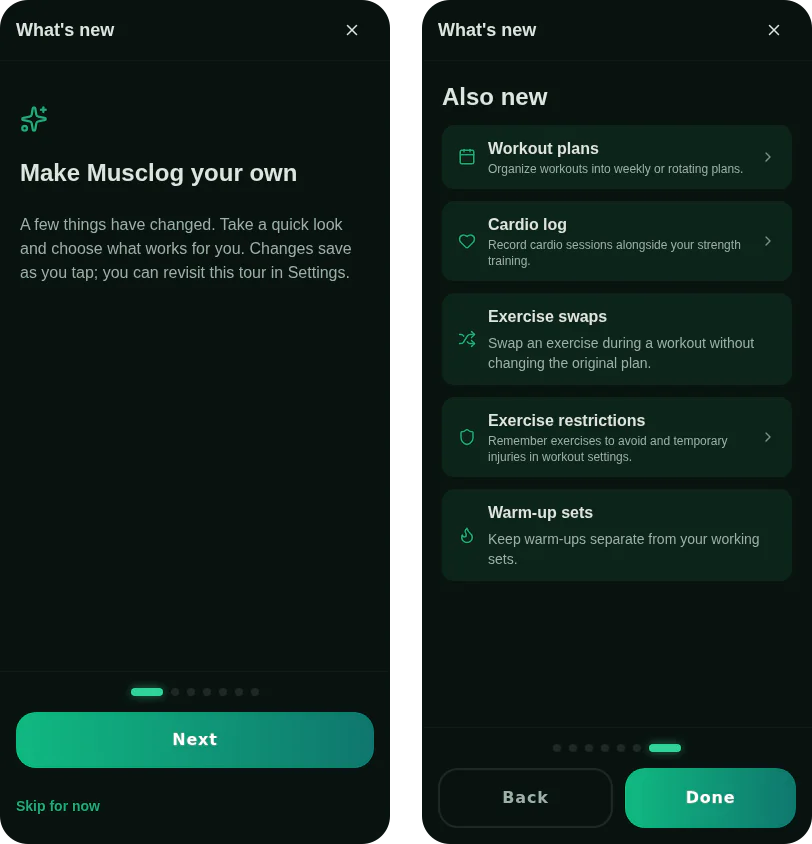
- featureList: a short list of “also new” items, each optionally tappable
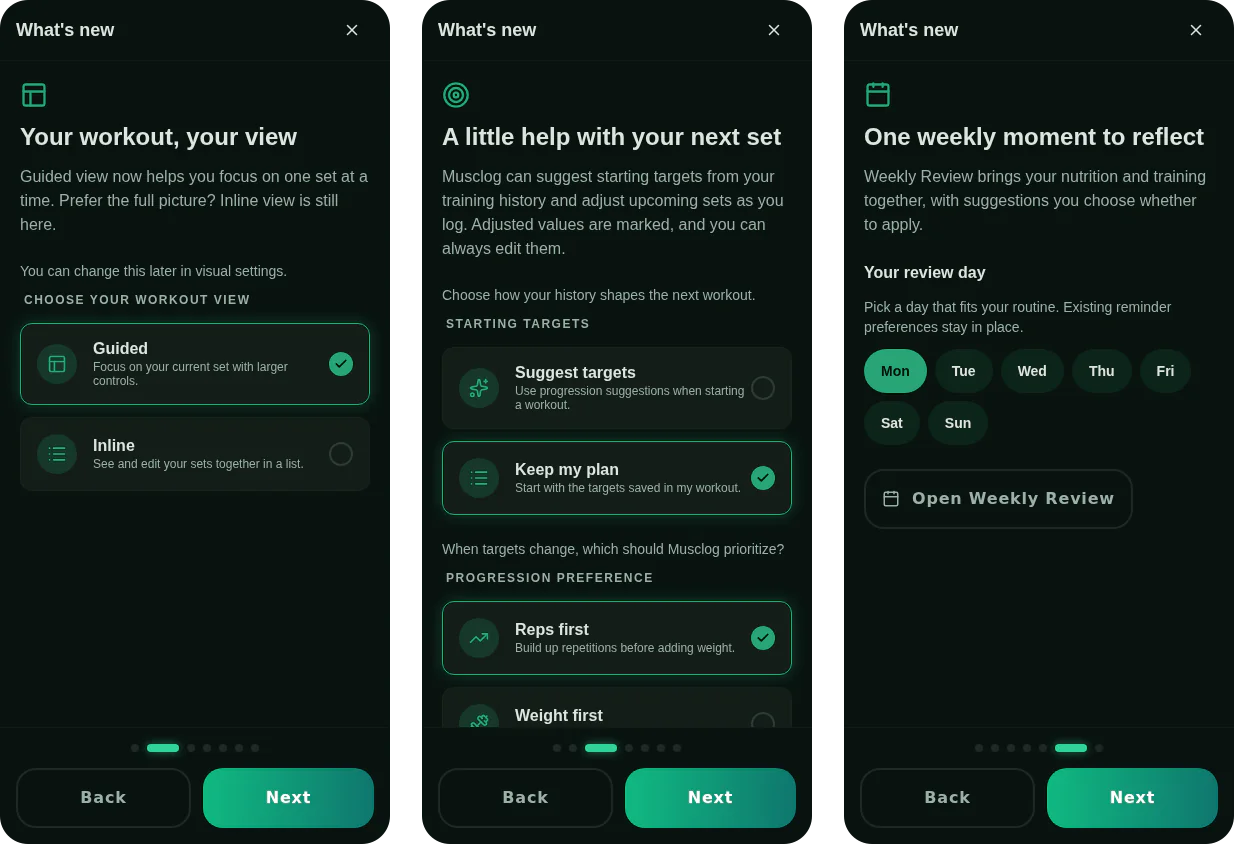
Tapping a choice saves it immediately. There’s no Save button and no “apply at the end”, because a tour you can abandon halfway should never leave your choices in limbo.
A release is a JSON file
The tour content is not React. For each app version there’s a file, data/whatsNew/2.13.1.json, with ordered pages and blocks:
{
  "id": "workoutAutonomy",
  "type": "choice",
  "setting": "workoutAutonomy",
  "titleKey": "whatsNew.releases.v2_13_1.workoutAutonomy.title",
  "descriptionKey": "whatsNew.releases.v2_13_1.workoutAutonomy.description",
  "options": [
    { "value": "suggest", "labelKey": "…suggest.label", "icon": "sparkles" },
    { "value": "manual", "labelKey": "…manual.label", "icon": "list" }
  ]
}
Adding a release to the app is: write the JSON, register one import, add the translations in five languages. No new screens.
The part I care about is what the JSON is not allowed to say. It can’t name an icon, a setting or an action that the code doesn’t already know. Those are closed lists:
export const WHATS_NEW_SETTINGS = [
  'workoutView',
  'workoutAutonomy',
  'progressionMode',
  'autoStartRestTimer',
  'restTimerHaptics',
  'reviewWeekday',
] as const;

export const WHATS_NEW_SETTING_CATALOG = {
  workoutView: { kind: 'enum', values: ['guided', 'inline'] },
  workoutAutonomy: { kind: 'enum', values: ['suggest', 'manual'] },
  progressionMode: { kind: 'enum', values: ['reps_first', 'weight_first'] },
  autoStartRestTimer: { kind: 'boolean' },
  restTimerHaptics: { kind: 'boolean' },
  reviewWeekday: { kind: 'weekday' },
} as const satisfies Record<WhatsNewSetting, SettingSpec>;
The satisfies Record<WhatsNewSetting, …> is the trick I keep coming back to in this codebase. Add a setting to the list and the compiler refuses to build until you’ve described its values and told the tour how to read and write it. The same goes for actions. The JSON file is the cheap, frequent thing; the vocabulary is the rare, reviewed thing.
At startup each file is parsed by a validator that fails at the smallest usable unit. A bad option drops that block, not the page; a bad block drops that block, not the release. The idea is that a typo in one choice should never turn into a tour that crashes on launch. In development it logs exactly what it dropped and why. In production it just carries on.
“Seen through” is not “last announcement”
My first instinct for tracking this was a stored value: the version of the last announcement the user saw. That breaks down quickly. The question the app really needs to answer is which versions has this person already been told about, and that has nothing to do with whether a given release had an announcement.
So the stored value means seen through this app version. Open the app on 2.13.1 and the record becomes 2.13.1, whether or not there was anything to show. Two properties fall out of that:
- It only moves forward, including when an update has no announcement and when somebody downgrades. A downgrade never makes an old tour reappear.
- The tour is just a filter: every release newer than what you’ve seen and no newer than the version you’re running.
That filter is a pure function, selectWhatsNewFlow, which takes the releases, the stored version and the current version and returns pages. No React, no storage. Most of the tests are about it.
Skipping three updates
People don’t update on schedule. Somebody who goes from 2.11 to 2.14 is owed three releases’ worth of news, and showing all of it is a bad tour.
The rule I settled on: pages are capped (six), and the cap is spent on the newest releases first, then the result is shown oldest-first so it reads in the order things happened. An older release gets squeezed out before a newer one does. And since an old announcement can become wrong, any page or block can say supersededIn: "2.15.0", and from that version on it’s gone. Pages left with no blocks disappear.
When it is allowed to appear
This took more thought than the tour itself, because a “what’s new” screen is an interruption, and there are plenty of moments when interrupting is rude or wrong.
It checks once per JS session. It waits for the database to be ready (there’s a boot gate for that), and for onboarding to be complete. It only shows while the home screen is focused. And it stays quiet if the app was launched from a widget camera shortcut, because someone who tapped “scan food” does not want a tour.
New installs never see it: finishing onboarding writes “seen through this version” in the same storage write that marks onboarding complete, so there’s no window where a fresh user is both onboarded and owed a tour.
Backups needed a decision too. The seen record is part of a backup, so restoring on a new phone doesn’t replay the tour. Restoring a backup from before the feature existed has no record, so those users do get it, which is correct: they haven’t seen it.
Done, Skip and the close button all save the record. Killing the app mid-tour doesn’t, so you see it again next time. I decided that was better than the alternative of losing the tour because the app was swiped away on page two.
Choices that don’t lie
A choice block reads the real setting when the page opens, so the control starts on what you actually have, not on what the release author assumed. Tapping an option updates the UI at once and writes in the background. If the write fails, the control goes back and shows an error.
The fiddly bit is that reads and writes can overlap: a slow initial read finishing after you’ve already tapped would otherwise overwrite your choice with the old value. The hook keeps a revision counter per setting and a generation token for the whole page, and a read result is thrown away if either has moved on. A choice you never touch never writes anything.
The weekday choice has a side effect: it reschedules the weekly review notification. If scheduling fails after the setting saved, it puts the old weekday back and tries to restore the old notification, so what’s on screen, what’s stored and what’s scheduled can’t disagree.
Dismissal is serialised for the same reason. Two quick taps on Done can’t race each other into writing an older version over a newer one, and if the write fails the tour stays open so you can try again, rather than closing and re-showing next launch for no visible reason.
Testing something that shows once
The usual problem with a once-ever feature is that you can’t see it twice. Settings has a debug section for this: it can show or clear the stored record, set it to any version, and preview an individual release even before the app version is bumped. Editing the record from there also resets the once-per-session gate, so the tour can actually be re-triggered without restarting.
There’s also a registry test that does the boring, important thing: every JSON file in the directory must be registered, must parse cleanly, and must have all its keys translated in all five languages. A release that only ships in English fails CI.
What I’d do differently
The vocabulary approach has a cost I accepted knowingly: a tour that needs a new kind of control, say a slider, means touching code. For the four block types I have, that’s rare, and the alternative (a tour language flexible enough to describe anything) would have been a worse version of React.
I also think the “choice” block is the part that earns its place. Telling people about a setting is easy. Letting them make the decision in the same breath, with no navigation, is the difference between a changelog and onboarding.
