I rebuilt cycle tracking around the days you actually log
Musclog already had cycle tracking: period dates, symptoms, a phase wheel and reminders. But having those pieces on a screen did not make a useful diary. You could log something, then struggle to correct it. A prediction could look precise without explaining how little history it had. A phase label could offer a confident story about your energy without ever looking at your own records.
I wanted the whole loop to work: choose what to track, record a day, see what you recorded, correct a mistake, understand a pattern and take your history with you.
That turned into a substantial rebuild. The new cycle area has a daily journal, a calendar, editable periods, comparisons, trends, reminders, exports and privacy controls. It also works for someone who wants to record symptoms without tracking periods.
Start with what you want to record
Setup now offers three choices: bleeding and symptoms, symptoms without periods, or skip. You can change that choice later in cycle settings. Pausing keeps your history; resuming uses the existing records.
You can also choose what you care about: timing, symptoms, mood or keeping a record. Those goals are independent and editable. Someone who wants a diary should be able to use the diary without having to want a predicted date.
Birth control and life stage are part of setup too, and later changes become dated entries in your context history. Setup applies your current choice from today. It does not assume that the contraception you use now was also what you used for every past period you enter.
A quick entry when you have a few seconds
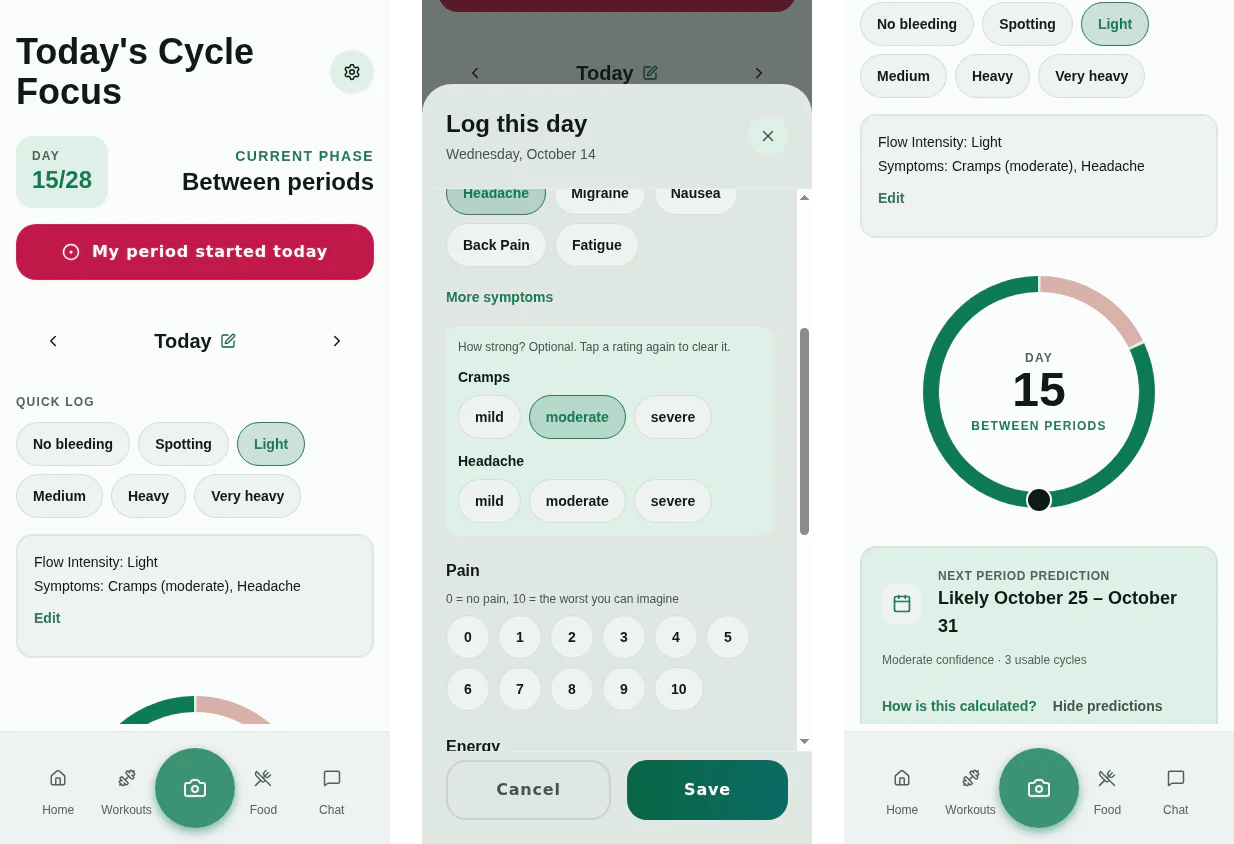
The quick-log row lets you record bleeding and your pinned symptoms. You can choose up to six favorites, add your own symptom names, and accept a suggestion to pin something you have recorded repeatedly across cycles.
The full day sheet gives you more room:
- Bleeding level, including spotting or explicitly no bleeding.
- Symptoms, plus an explicit “no symptoms today.” A tap adds a symptom and the next tap removes it; a mild, moderate or severe rating is a separate, optional choice. An earlier version cycled through the ratings on every tap, so taking back one tap took three more.
- Pain from 0 to 10, energy, mood and a note.
- Optional sleep hours, basal temperature, discharge, medication or dose, sexual activity and tags.
- Daily-life impact, leakage, clots, LH-test and pregnancy-test observations.
- Your own text, number, yes/no or bounded integer rating fields.
You choose which optional fields appear. Removing a custom field keeps its historical values and labels readable. PMS/mood, fertility-observation and perimenopause diary presets add relevant fields and favorites while keeping your existing choices. These are ways to organize observations, with no diagnostic score attached.
There are a couple of small distinctions I wanted to preserve. An empty day means nothing was recorded. “No symptoms today” is a recorded answer. A pain score of zero is also an answer. Treating all three as empty would make comparisons look cleaner while making them less truthful.
Mood uses the same entry as Home and Progress. Saving the day and its mood happens together, and clearing the day explicitly clears that shared mood too, after asking first. You do not have to maintain two competing copies of how you felt. If mood cannot be loaded, the rest of the day still saves.
History you can correct
The calendar shows recorded bleeding, spotting, observations and the predicted window. Different marker shapes, a text legend and spoken day descriptions make the distinctions available beyond color alone.
There is also a period list with durations and cycle lengths. You can edit a start or end, delete an entry and undo the deletion. Predictions and reminders recalculate from those changes.
When adding a past period, you can supply an end date, say that you do not remember, or use your usual duration. The last choice is stored as an estimate. It never becomes a date the app claims you actually recorded.
Logging bleeding outside an existing period offers to start a period on that day. Symptoms-only tracking still lets you record unexpected bleeding or spotting, but does not turn that entry into a period-start prompt.
Predictions with their workings visible
The next-period prediction is a range, with confidence based on usable cycle history and how much the recorded lengths vary. Sparse histories get wider windows. The prediction details show which cycles contributed, which were excluded and why.
You can mark a cycle as excluded yourself. An unusually long interval may be flagged as possibly containing a missed entry; if that really was your cycle length, you can confirm it. That confirmation only clears the missed-entry flag. It does not override other exclusion rules.
If you do not know your usual cycle length, you can say so. Without usable history, the app keeps the day count but withholds a fallback predicted date. You can also hide predictions entirely and keep logging.
The counter keeps counting from the last recorded start. The old approach wrapped it around the average cycle length, which could turn an overdue cycle into an apparent new cycle without a new period ever being logged. The updated view can say “later than your usual range” and keep the actual elapsed day visible.
The inspector includes a retrospective check using earlier recorded starts to make each estimate. That helps you see how the prediction would have behaved without letting it peek at the answer. The ranges and confidence labels are historical heuristics, not calibrated probabilities.
The fertile-window estimate is a separate opt-in, off by default for new setups. Its explanation appears before you enable it, and the estimate carries a not-for-contraception note. Existing active trackers retain the previously visible option during migration.
That opt-in now covers the phase names too. Follicular, ovulatory and luteal are placed by assuming ovulation fourteen days before the next period, so they are the same estimate under another name. With the estimate off, the wheel shows only what you recorded: bleeding, and the days between periods.
Context changes what the app shows
Contraception choices now distinguish combined and progestin pills, hormonal and copper IUDs, implants, patches, rings and injections. The dated context history lets prediction rules account for changes instead of treating a profile label as decoration.
Life-stage choices include PCOS, perimenopause, postpartum, tracking without bleeding, pregnancy, pregnancy loss, hysterectomy and menopause. Depending on that context, the app can caveat or suppress predictions, exclude intervals from prediction history, or hide period actions while keeping the diary available.
Changing context keeps the records you already made. The app can still show trends and observations when a predicted period date would not be useful.
Patterns from your own records
I removed the fixed phase-based energy labels, hormone cards and workout intensity multipliers. A phase estimate alone did not support those personalized claims.
The new insights look for observations in your actual history: recurring symptoms or pain near recorded period starts, symptoms in the seven days before a recorded period, changes in cycle length or bleeding duration, and mood, energy, sleep or workout-volume patterns.
Insights require a minimum amount of history and state how many cycles support them. Workout observations link to the sessions involved. The wording describes an association in your records without claiming that the cycle caused it or prescribing a different training load.
The workout observation needed more care than the others. Session volume swings with the workout itself: an arm day near a period start compared with leg days otherwise “shows” lower volume without saying anything about the cycle. It now compares each session only with the same workout away from period starts, leaves out deliberately lighter weeks, and needs four comparable cycles before it says anything. It also stays on the cycle screen. Shown at the start of a training session, an observation reads like a prediction that today will go worse, and the research on cycle phase and strength does not support that.
You can compare up to six cycles by cycle day or by the fortnight before the next recorded start. Filter for symptoms, bleeding, pain, energy or mood, and tap a cell to edit its entry. Missing observations stay visibly different from explicit none.
For a longer view, dated trends cover pain, energy, mood, sleep, temperature, daily-life impact, bleeding and custom numeric or rating fields. Local word search helps you find entries. These views work without period dates too, so symptoms-only tracking has useful history of its own.
Privacy controls belong beside the diary
Periods, daily observations, context history, notes and cycle preferences are stored as encrypted local data. Record identifiers and creation/update timestamps remain readable metadata; encryption does not make every trace of activity disappear. The automatic recovery points the app keeps on the device store cycle records encrypted too; downloading one makes a copy you can restore elsewhere.
On supported native devices, you can lock the cycle area or the whole app with biometrics or a device credential. The lock covers a sheet that was open when it engaged, hides the app’s contents from the app switcher while it is in the background, and hides the cycle chart in Progress.
Pausing keeps your history. Removing a day’s entries or a context change erases them; a removed period can be undone until the app restarts and is then erased. Permanent deletion removes the cycle records and offers to remove local recovery points that could contain copies. Shared mood remains, and the confirmation explains that. Files you exported or shared elsewhere are outside the app’s reach.
Reminders that explain themselves
A notification is where a period tracker most easily loses trust. Looking at how other trackers handle it, the same complaints keep coming up. People turn off every notification to escape one noisy kind. A lock-screen preview tells a coworker more than intended. A late period gets treated as a pregnancy prompt. And a calendar estimate arrives sounding like a fact.
So each cycle reminder is its own switch, and the settings say what each one is: when it fires, how often, and whether its date is an estimate from your logged cycles or a time you chose.
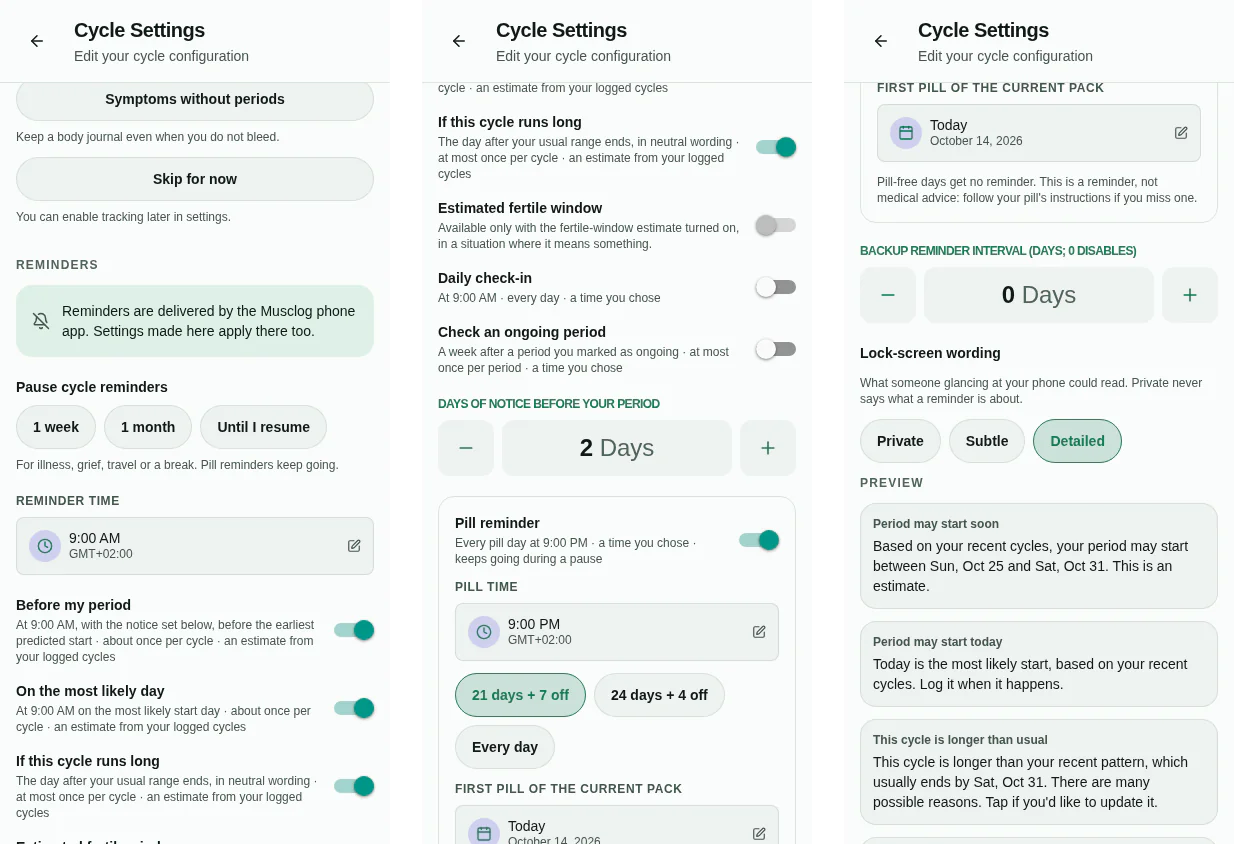
- Before my period fires ahead of the earliest predicted start, with the notice you choose. In detailed wording it states the range, for example “between Sun, Oct 25 and Sat, Oct 31”, and calls it an estimate.
- On the most likely day is optional.
- If this cycle runs long is optional and deliberately neutral: “This cycle is longer than your recent pattern. There are many possible reasons.” It never suggests one.
- Pill reminder has its own time and knows the pack: every day, 21 + 7 or 24 + 4, with no reminders on pill-free days.
- The daily check-in, an ongoing-period check, backup reminders, and the fertile window when you have opted into that estimate.
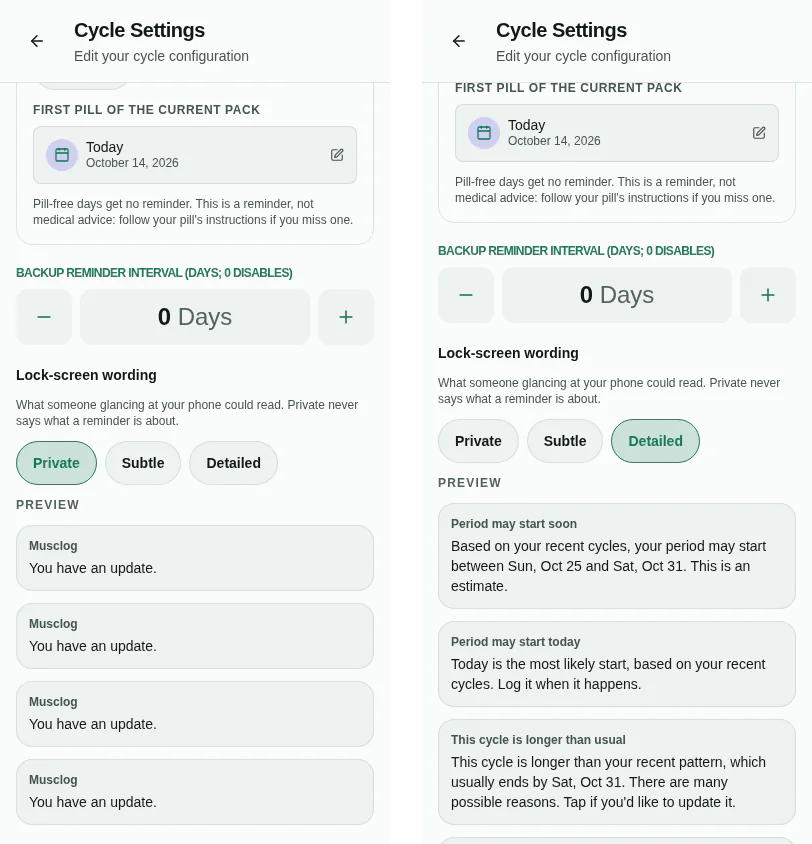
What appears on the lock screen is a separate choice with three levels. Private, the default, never says what a reminder is about. Subtle names the task (“Time for your daily check-in”) but never periods, fertility or pills. Detailed says it plainly. The settings show the exact text of every reminder you have on, generated by the same code that schedules it, so the preview cannot promise wording the phone does not use. On Android, cycle reminders also get their own notification channel whose text is hidden on a secure lock screen.
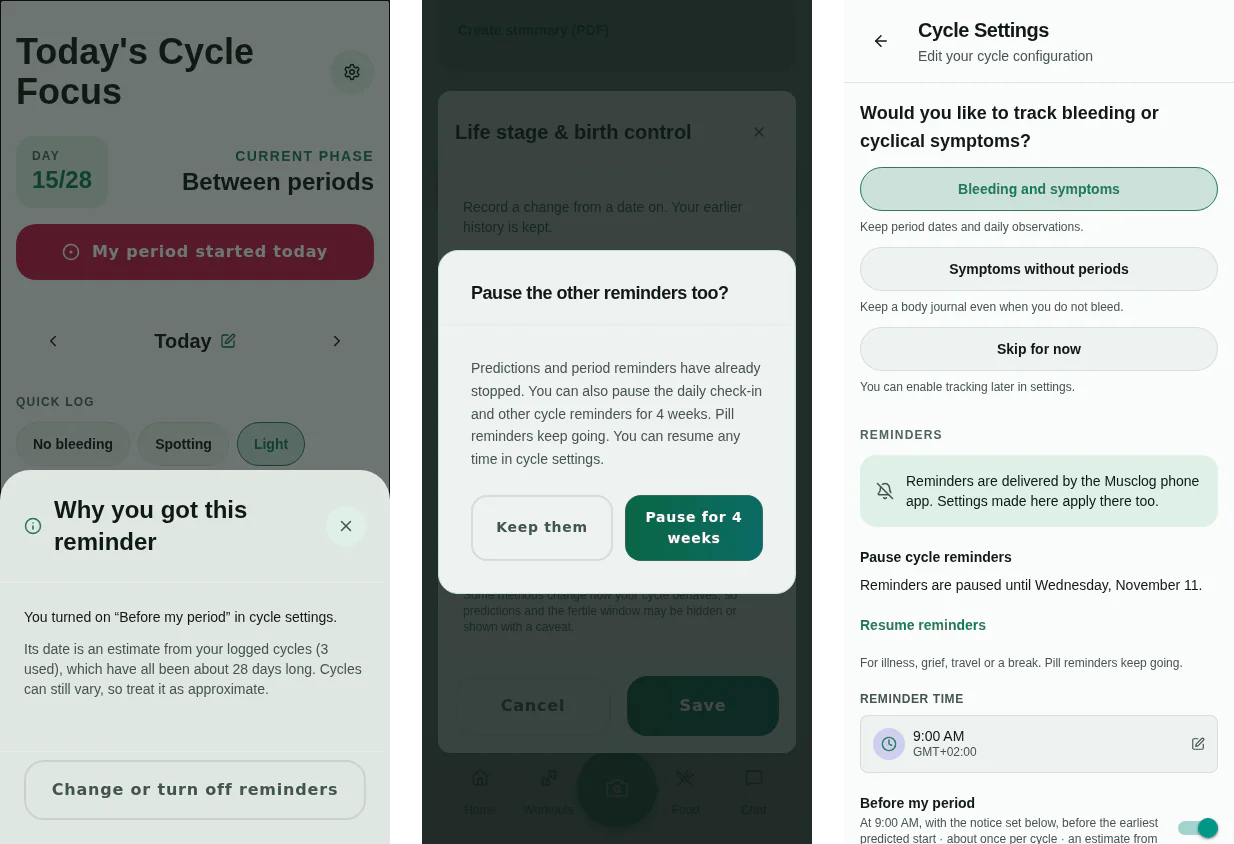
Tapping a reminder opens a short explanation: which setting sent it, and what its date rests on. For an estimate that means how many cycles were used and how much they varied, or that it still comes from the usual length you entered. A pause silences everything except the pill reminder for a week, a month or until you resume. Recording a pregnancy loss already stops every prediction and period reminder; the app then offers, and never applies on its own, a four-week pause of the rest.
Permission is requested when you turn a reminder on, not when the app starts. A delivery check says whether a reminder can actually arrive (the phone’s permission, Musclog’s notification switch, the cycle switch), shows the next one, and can send a test notification in your chosen wording. The daily check-in is a single repeating reminder. It used to be a month of separate ones, and iOS keeps at most 64 pending notifications per app, so those could crowd out workout reminders.
Take the history with you
Periods, daily logs and context history can be exported as CSV. An appointment summary covers a chosen three-, six- or twelve-month range and includes recorded dates, symptoms, pain, notes, context, mood and optional observations. Native devices can share a PDF; web opens the print dialog. The summary identifies the content as self-recorded data.
Cycle-only JSON files include preferences, custom labels, context and shared mood history. Import previews show additions, updates and skipped entries. Existing dates win by default; replacement and preference restoration are explicit choices. Overlapping periods are skipped, and importing cycle data leaves workout and nutrition records alone.
External CSV import has column and date-order mapping followed by validation. It does not directly understand proprietary Clue/Flo archives or Apple Health XML.
For recovery, there are password-protected, authenticated cycle backups. Creating one is a manual action with password confirmation. A backup reminder does not create a file or upload anything, and “last prepared” means the file was prepared for saving or sharing, not proof that it reached another device. Readable JSON, CSV and PDF exports are identified as unprotected.
On supported native platforms, you can explicitly read, preview and import bleeding, spotting and basal-temperature observations from Health Connect or HealthKit, or manually export supported entries. Imported observations keep their source identity separately from self-report, do not create period starts, and can be imported again without duplicating the same source record. Permissions can limit the history available.
What a second review caught
After the rebuild, I reviewed it again with a stricter eye, and some of what it found was the kind of thing a privacy-focused feature cannot ship with:
- The lock did not cover a sheet that was already open, the app-switcher snapshot, or the cycle chart on the Progress screen.
- Removing a day or a period only hid it. Every full export, including the automatic recovery points, then wrote it out in readable form, and the recovery points stored the whole diary in plaintext. The migration’s own safety backup was a readable copy of exactly the history the migration was meant to remove. It is now deleted once the converted records read back correctly.
- With the fertility estimate off, the header could still say “Ovulatory”.
- An open period on day seven could show “Period, day 7” next to “Follicular”, because the banner and the phase used different rules for whether a period was still going. They share one now.
- The detailed period reminder said “in 2 days” whatever notice you had set, and the fertile-window text still claimed to be “useful for tracking your energy levels”.
- A mood that failed to load blocked saving the rest of the day.
Each of these now has a test.
A save has to mean saved
The final part of this update is less visible, but it affects every feature above.
During review, I found that config edits could save correctly while leaving the screen on the old values. WatermelonDB reuses model objects, and putting the same object back into React state did not trigger the update I expected. The provider now captures the changed encrypted config value so the diary and prediction settings refresh immediately.
Preference controls also used to send whole snapshots. Change two independent settings close together and the second save could overwrite the first. They now send patches, merged against the latest stored config inside the writer. List changes use that same current state.
Failed writes had another sharp edge: preparing a database update changes the cached model before storage commits. A rejected save could therefore look saved in memory. Cycle writers now restore the cached state on failure so you can retry.
Finally, converting old plaintext history into encrypted records is one transaction, including removal of the originals. Splitting a large history into separate commits could leave it halfway migrated. Permanent cycle deletion follows the same one-transaction rule.
The regression tests deliberately reject writes, retry them, migrate a history larger than the old batch limit, and make preference edits concurrently. A diary needs to keep the entry you made, show the correction you saved, and tell you when it could not save either.
