My workout app now explains every number it changes
Musclog has always nudged your numbers. You did 60 kg for 8 last time with plenty left in the tank, so today’s set says 62.5. That’s the whole point of progressive overload, and it’s useful.
It’s also the kind of feature that feels great when it’s right and creepy when it isn’t. You open a set, the weight isn’t what you planned, and you have no idea who changed it or why. Did you type that? Did the plan say that? Is the app broken?
For this release I set myself one rule: a number the app changed on your behalf is never presented as if you chose it. Everything else in this post follows from that.
The explanation is the data
The naive way to explain a change is to compute the new number in one place and write a sentence in another. They drift. The sentence says “you had 3 reps in reserve” while the code looked at something else.
So the calculation doesn’t return a number. It returns a number and the reason it’s that number, as a structured value:
export type StartSetAdjustment = {
  cause: 'progression' | 'deload' | 'repeat';
  /** The primary value that changed: the weight when it moved, otherwise the reps. */
  field: 'weight' | 'reps';
  from: number; // what the plan said
  to: number; // what the set carries now
  plan: { weightKg: number; reps: number };
  /** How the last session went: first working set and average RIR. */
  last: { weightKg: number; reps: number; averageRepsInReserve: number };
  now: { weightKg: number; reps: number };
  /** Present when the exercise's own progression rule set the numbers. */
  rule?: StartRuleDetail;
};
That object is saved with the set. The UI never decides anything: it renders the sentence for (cause, field, plan, last, now). There’s a single hook that turns an adjustment into text, and the live workout, the preview, “Next time” and the weekly review all use it, so the same change can’t be phrased two ways.
The marker works the same way. An adjusted number gets an accent underline (and a small calculator icon in the guided view), so it reads without relying on colour, and it disappears the moment you type over the number, because from that moment it’s yours. Which fields get the marker is derived from the adjustment by one function, not decided by whoever draws the card. An earlier version marked the weight card unconditionally while the app was changing reps, so the highlight pointed at the wrong number. Making the marker a function of the data fixed that class of bug, not just that instance.
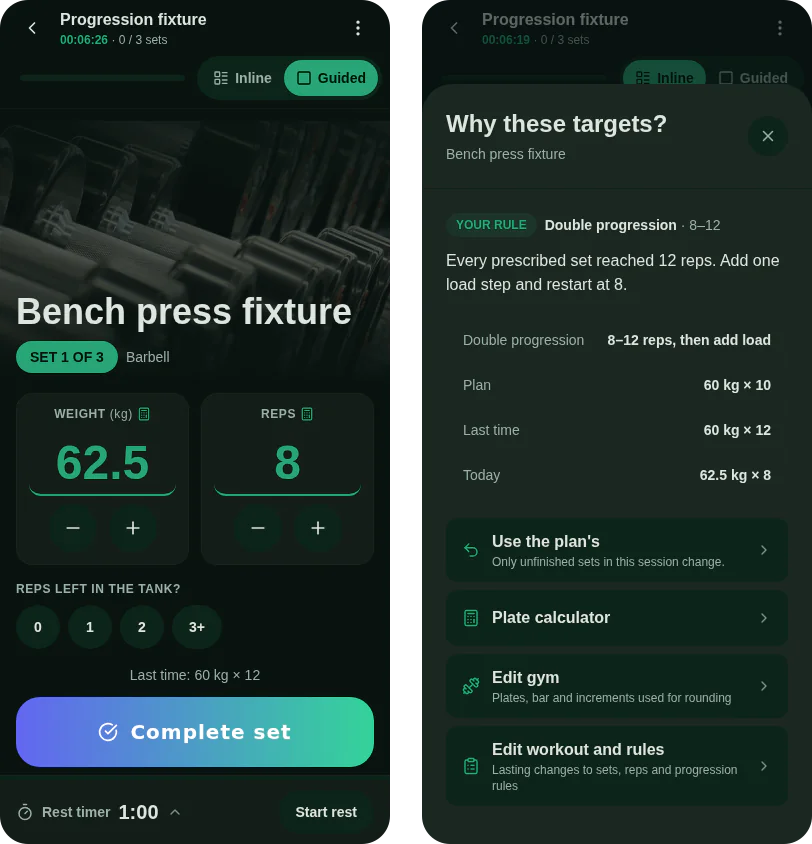
One cause is deliberately not marked: carry-over. If you changed the weight on set 1, set 2 follows it. That number is yours from the previous set; calling it “adjusted” would be taking credit for your own decision.
Two moments, two kinds of change
Numbers move at two points, and they have different evidence.
At the start of a workout, the app looks at the last completed session of each exercise and decides where today starts. The progress rule: if last time met the effort target (about 2 reps in reserve) and the planned reps were hit, move on. A deload needs two failed sessions in a row at the same load, because one hard day is noise, and the first miss just holds.
Between sets, the app re-targets the next planned set from what just happened: it carries your actual load over, then recomputes weight or reps (whichever your progression mode prefers) to land the set at its target reps in reserve. All of that arithmetic is one pure function, computeIntraSessionAdjustment, returning new values plus the explanation. The hook that runs the session only applies the result.
Keeping these as pure functions mattered more than I expected. Almost every bug below was found, and then pinned, with a six-line test and no UI.
Rules are data too
Some people don’t want “the app’s algorithm”, they want 5×5, or double progression, or a top set with back-offs. So an exercise can carry a rule stored as JSON on the workout’s exercise: double progression, linear, top set + back-off, or percentage of a training max.
Two things I was careful about:
- A rule ignores reps in reserve. RIR is optional, and a set you didn’t rate stores a placeholder zero that would otherwise read as “to failure”. Rules only look at performed reps and loads.
- A rule that can’t be trusted is dropped, not run. Rows can arrive from a backup, a share or a newer build. Every field is bounds-checked, and one out-of-range number makes the whole rule be treated as “none”, so the exercise falls back to automatic progression instead of running half a prescription.
The percentage rule also carries its training max from session to session instead of re-estimating it every time. Re-estimating ratchets your loads down, because a set at 72% for three reps implies a lower max than you actually have.
What reviewing it turned up
Before release I had the whole branch reviewed, and then I wrote tests to confirm each finding rather than trust it. Three coaching bugs were real, and all three were in the automatic path, the one without explicit rules:
1. A half-finished session counted as a success. The summary of last time read only the first working set. Do set 1 of 3 well, skip the other two, and the next session moved up. The explicit rules already checked “were all prescribed sets performed”; the automatic path never did.
2. An unrated session was judged by its best set. With sets of 10 / 6 / 5 against a plan of 10, only the first set was compared, so every set went to 11 reps. The explanation then said “one more rep than the corresponding set last time”, which for set 3 was a claim about a 5 that nobody had checked.
3. 60 → 63 → 66 kg. The default step is 2.5 kg, but with no gym configured the result was rounded to a whole kilogram afterwards. Round 62.5 and you get 63, and no pair of plates makes it. This hit every metric user who never set up a gym, which is most people.
The fixes were small:
// The session is judged by its weakest set: one strong first set says nothing about the rest.
const worstReps = last.lowestReps ?? last.reps;
if (planReps == null || planReps <= 0 || worstReps < planReps) {
  return hold;
}
// Unfinished work never counts as success: hold until the whole prescription was done.
if (last.complete === false) {
  return { weightKg: last.weightKg, reps: last.reps, kind: 'repeat' };
}
And with no gym, metric loads now snap to multiples of 2.5 kg.
I changed two more things while I was in there. A deload used to be one load step, which on a 120 kg squat is about 2% and doesn’t deload anything; it’s now 10% of the load (never less than one step), matching the linear rule. And a load step bigger than a quarter of the current load isn’t used any more, so a 6 kg lateral raise keeps adding reps instead of jumping 40% in one session.
The point I’d draw from this is not “I write bugs”, though I do. It’s that bugs 1 and 2 would have been almost invisible without the explanation feature. The numbers looked plausible. It was the sentence next to them, saying something specific that wasn’t true, that made the problem checkable.
One more small thing: rating effort has to be easy
All of this runs on one input that most people skip: how many reps you had left. In the first version it lived behind a details sheet, one tap on the set number or a row below the fold. An input that costs three taps gets left empty, and an empty one makes the progression fall back to reps alone.
So there’s now a one-tap row on the current set: 0 · 1 · 2 · 3+.
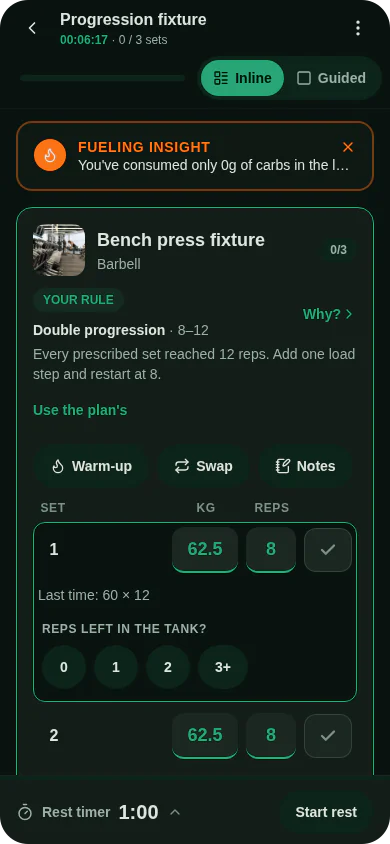 Tapping the value you chose again clears it, so “unrated” stays a real state and never becomes a quiet zero. The best automation in the app is only as good as the one number you can’t be asked for without making it cheap.
