My weekly review had buttons that could never work
Musclog has had adaptive calorie targets for a while: log your food and your weight, and the app estimates what you actually burn and adjusts. It did that daily, quietly, which has the same problem as silently changing your weights in the gym. Your target moves, and you never decided anything.
So 2.13 adds a Weekly Review: once a week, on a day you pick, the app shows how the last seven days went for training and for nutrition, and proposes new targets. You apply them, edit them, or keep what you have. Nothing changes until you say so.
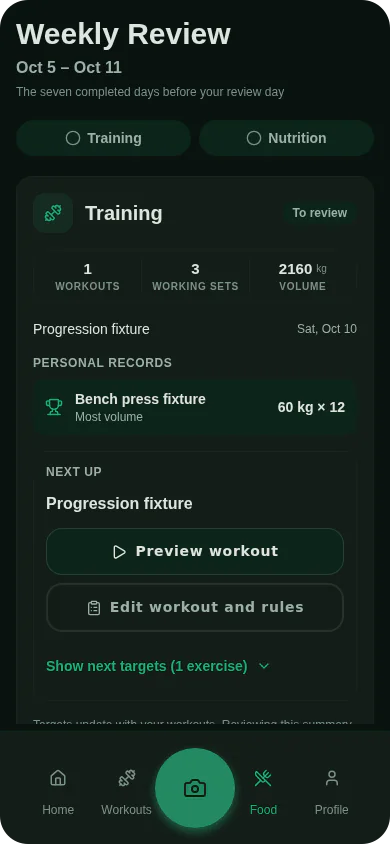
That’s the feature. The interesting part is what it took to make “nothing changes until you say so” actually true.
Targets have dates now
The daily mode stored the target on the goal itself. If the target changed, the old value was gone, and every past day suddenly “had” the new target. Your history from three weeks ago would show you over a budget you never had.
Weekly targets are stored differently: as periods with a start date and an optional end date. Applying a review never edits anything in place. It closes the period that’s running and opens a new one:
const from = localDayKeyPlusCalendarDays(localDayStartMs(new Date()), 1);
// close whatever is still open from tomorrow on…
row.prepareUpdate((record) => {
  record.effectiveUntil = Math.max(from, record.effectiveFrom);
});
// …and start the new targets tomorrow
NutritionTargetService.preparePeriod(goal.id, accepted, from, now, review.id);
Two decisions are in there.
New targets start tomorrow, not today. If you review on Monday evening after eating, switching Monday’s budget under you would rewrite a day you’ve already lived. Tomorrow is the first day the new numbers can be honest about.
Every period remembers which review created it. “Why is my target 2,296?” has an answer you can click on.
Every screen that shows a target asks one resolver, NutritionTargetService.resolve(goal, date), which picks the period covering that date and falls back to the older modes.
Periods also bit me once. The goal editor could switch you out of weekly mode, or change your macros, without closing the open period, and a period outranks the goal. So you’d edit your targets, save, and see the old ones still applied, because last week’s approval was still in force. Now every mode change goes through one function that updates the goal and closes the periods in the same batch.
“Enough data” has to be a rule you can see
You can’t recommend anything from a week where someone logged food on two days. The question is where the line is, and the first version got it wrong in a way that’s easy to miss.
It required food on all seven days. One forgotten Sunday blocked the whole week. And it ignored my own fasting-day feature, where you can mark a day as an intentional fast, so anyone who used it could never apply a review, ever.
Now it’s food (or a flagged fast) on 5 of 7 days, plus at least two weigh-ins. The recommendation itself is built from the last 30 days of history, so this check only asks whether the reviewed week looks like a normal week, not whether it’s perfect.
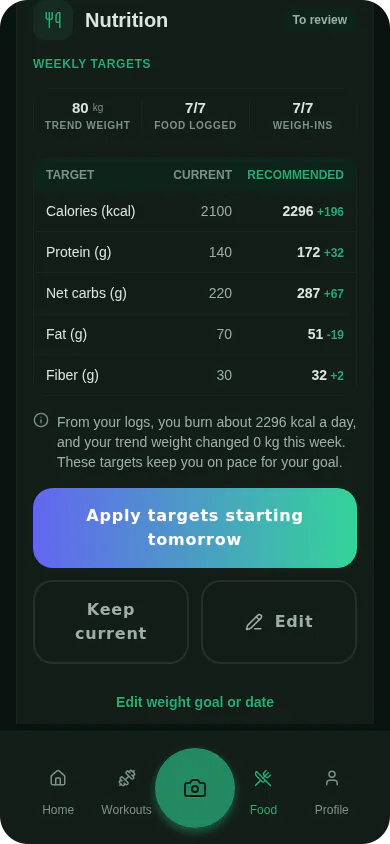
Two details I care about here:
- The sentence telling you what’s needed is built from the same constants the check uses. The first draft of the copy said “at least three days” while the code wanted seven. Interpolating
MIN_WEEKLY_FOOD_DAYSinto the text means they can’t disagree again. - The explanation under the table comes from what the recommendation was actually built on: the expenditure it estimated, and how your trend weight moved. “You burn about 2,296 kcal a day and your trend weight changed 0 kg this week” is a specific claim you can check, not a generic “based on your progress”.
The buttons that could never work
When the week didn’t have enough data, the review showed two helpful buttons: Log weight and Complete food entries. They opened the weigh-in screen and the food diary.
For today.
But the review is about the week that already closed. Logging food today adds nothing to last week. You could press those buttons forever, do exactly what they asked, come back, and the review would still say it needed more data. They were perfect dead ends: plausible, polite, and impossible to satisfy.
The fix is to say which day is missing. The review now works out the gaps, the earliest day with no food and the latest day with no weigh-in, and the buttons open the diary or a weight entry on that day:
gaps = {
  foodDay:
    foodDays < MIN_WEEKLY_FOOD_DAYS
      ? (days.find((day) => !foodDayKeys.has(keyOf(day))) ?? null)
      : null,
  weightDay:
    weightDays < MIN_WEIGHT_ENTRIES
      ? ([...days].reverse().find((day) => !weightDayKeys.has(keyOf(day))) ?? null)
      : null,
};
When you come back to the review it reloads the evidence, so filling in Thursday’s lunch unlocks the button right away.
A failed save must not look like a success
WatermelonDB has a sharp edge here. When you prepare an update, it changes the record in memory immediately, before the batch is committed. If the commit then fails (disk full, say), the database didn’t change, but the model the UI is holding did. The review would show as decided while nothing was saved, and you couldn’t retry.
Every write in this feature goes through a small helper that snapshots the records first and puts them back if the batch throws:
const snapshots = existing.map((record) => ({
  record,
  raw: { ...record._raw },
  state: record._preparedState,
}));
try {
  const operations = prepare();
  if (operations.length) {
    await db.batch(...operations);
  }
} catch (error) {
  for (const { record, raw, state } of snapshots) {
    record._raw = raw;
    record._preparedState = state;
  }
  throw error;
}
The decision, the closed period and the new period are one batch, so they land together or not at all. The test for it literally makes the batch throw “disk full” and checks that the review is still open and the old target still applies.
Related rule: opening a review is not a decision. Opening, editing, cancelling or failing to save never marks a week as reviewed. Only Apply or Keep does.
Training doesn’t need your permission
The review has a training half too: workouts, working sets, volume, records, and what’s up next. But that half only acknowledges. Workout progression happens when you start a workout, set by set, with an explanation on every number. Making it wait for a weekly approval would mean training on stale numbers for six days to make a screen feel important.
So training and nutrition are reviewed independently. Someone with no nutrition goal, or who uses intuitive-eating mode, still gets a useful weekly look at their training, and never sees a calorie table they didn’t ask for.
What I took from it
The dead-end buttons are the part I keep thinking about. Each piece was reasonable on its own: a “log weight” button, a weight screen, a check that counts weigh-ins in a week. The bug only existed between them. They never asked which day the user needed to fix, and today was the default answer.
So now, for any “do this to unlock that” button, I ask one question: if the user does exactly what the button says, does the lock open?
