One workout screen, two views, and 1,662 lines I got to delete
The screen you stare at between sets is the most used screen in any workout app. In Musclog it was also the worst code in the repository: workout-session.tsx, 1,662 lines, one component that loaded the workout, held every draft, ran the rest timer, talked to a Bluetooth motion sensor, decided progression, and drew all of it.
It worked. It also had bugs that nobody had reported, because they looked like normal behaviour. This post is about taking it apart, and what fell out when I did.
Two ways to train
People log workouts in two different ways, and for years I made everyone use one of them.
Some want one set at a time: big numbers, readable from a bench, a giant button, nothing else. Others want the whole workout as a table, like a spreadsheet, so they can see what’s coming and fix set 2 while resting after set 3.
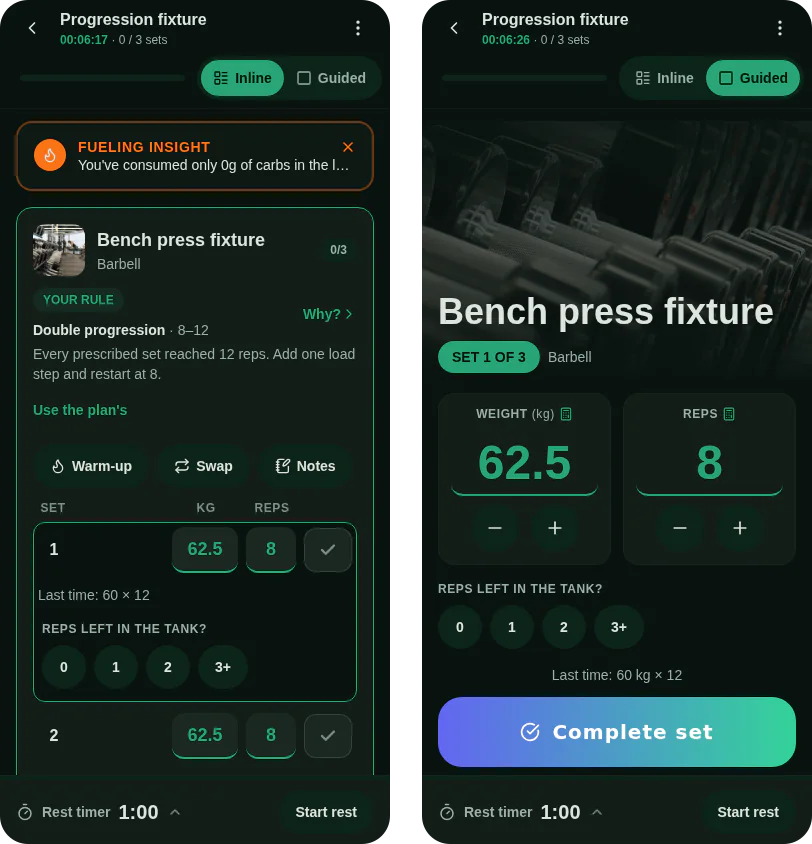
So the session now has both, Inline and Guided, with a switch at the top. The important part is not that there are two views. It is that they are two drawings of the same state. Switching mid-set keeps whatever you typed, because neither view owns anything.
One controller, two views
The whole screen now sits on a single hook, useWorkoutSessionController. It owns the drafts (what you typed but haven’t completed), the rest timer, and every write: complete, skip, reopen, revert, finish, discard. The views get values and callbacks and nothing else.
Between the hook and the views there’s a layer I’d skipped entirely before: plain functions with no React in them.
sessionModel.tsgroups sets into exercise blocks and decides which badge a block wears (“Your rule”, “Suggested”, “Learning”, “Needs attention”).setDraft.tsconverts between what’s in a text field and what goes into the database, in the user’s locale and units, and does the stepper arithmetic.
That split paid for itself in the first hour, because the first bug I found was in exactly that kind of logic.
The second exercise started at “Set 4”
The old screen labelled each set with its set_order. That column is one ordering key for the whole workout, not per exercise, because supersets interleave sets from different exercises and they all need one sequence. So with three sets of bench press first, the first set of the second exercise was “Set 4”.
Nobody reported it. It reads like an odd numbering choice, not a bug. Now every block numbers its own working sets from 1, and a warm-up gets a “W” and doesn’t take a number at all:
let working = 0;
const rows = blockSets.map((set) => ({
  set,
  workingNumber: isWarmupSet(set) ? null : ++working,
  prescription: parseSetPrescription(set.prescriptionJson),
}));
Five lines, and a test with two exercises that fails on the old behaviour.
The button you press on every set was below the fold
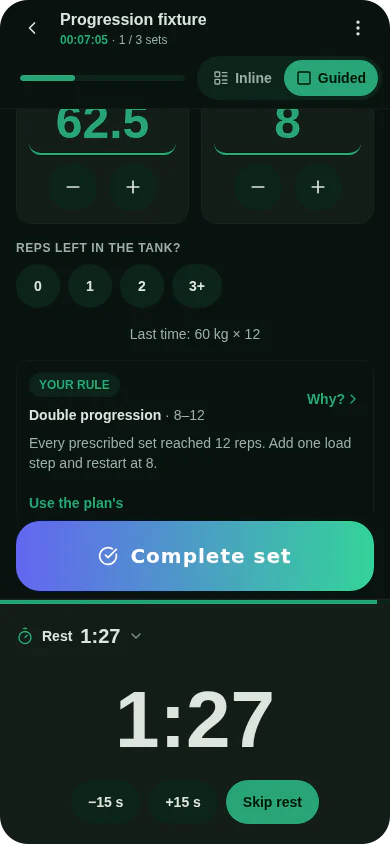
In the first version of Guided, the Complete button sat at the end of the scroll: under the photo, the steppers, the guidance card and the action chips. On a 390×844 phone, that put the one action you take on every single set below the fold. You had to scroll to finish every set.
It’s now pinned between the scroll view and the rest timer, so it never moves. Small, obvious in hindsight, and the kind of thing that only shows up when you actually train with the app instead of tapping through it at a desk.
A rest timer that doesn’t re-render the world
Two rest timer fixes are about React rather than fitness.
The clock only ticks during a rest. The old screen ran a one-second interval for the entire session, so every set row re-rendered once a second for an hour, mostly to display nothing. The interval now starts when a rest starts and stops when it runs out.
The expanded panel is derived, not pushed. In Guided the timer opens as a large panel you can read from across the gym; in Inline it stays a slim bar. If you collapse it during one rest, it should stay collapsed for that rest, and the next rest should start fresh. The obvious implementation is an effect that resets the state when a rest starts, which is a second render and an ESLint error about setting state in effects. Instead, each rest gets an id, and the choice is remembered for that id:
const timerExpanded =
  timerChoice?.restId === controller.restId
    ? timerChoice.expanded
    : resting && controller.view === 'guided';
When the next rest starts the id changes, the stored choice no longer applies, and the default comes back with no effect at all.
Things that outlived the screen
Pulling every write into one place made it obvious what each action is responsible for, and two of them were doing half the job.
Discarding a workout deleted the log and nothing else. The stored “active workout” survived, so Home kept offering to resume a workout that no longer existed. A scheduled “rest over” notification could still fire for it. The drafts stayed in storage, and in every backup made after. discard() now clears all of it.
Finishing navigated twice, once from the button and once from the effect that watches for the workout being completed, and the first navigation didn’t carry the feedback flag the summary screen expects. Now there’s exactly one navigation, from the effect.
And one that only showed up on the second set: the session forgot an exercise’s progression rule after the first completion. The screen reloads the workout after every save, and that reload path built its sets without the rule column. The first render came through a different path that had it. So set 1 said “Your rule: double progression” and set 2 said “Suggested”, while the explanation underneath still described the rule. A one-field fix, and a test that saves a set and checks the rule is still there afterwards.
Drafts survive a restart, but not every keystroke is a write
What you type before completing a set is a draft, and drafts are persisted, because the OS kills apps mid-workout constantly, and losing a half-typed set is infuriating.
The first version wrote all the drafts to storage on every keystroke. Correct, and wasteful. Edits are now written after 400 ms of quiet, and immediately on the moments that matter: completing a set, the app going to the background, leaving the screen, and discarding. The test that pins this does the honest thing and unmounts the screen with an edit still pending, then checks it was written anyway.
What I’d tell myself
The file was big, but size wasn’t really the problem. It was a mix of decisions (which set is “current”, what number a set gets, is this rest still running) and drawing, in the same function, where none of the decisions could be tested without rendering everything. Most of the bugs above were decisions. Once they were plain functions, each one was a few lines and a test.
The route file is now 440 lines and is mostly wiring. I’m not attached to the number. I’m attached to being able to answer “what happens when you discard a workout?” by reading one function.
