
Breaking my data out of a Game Boy cartridge
A few weeks ago I put Musclog on a Game Boy Color: a real cartridge layout, 517 foods baked into the ROM, your entire profile bit-packed into 23 bytes of battery-backed SRAM. I wrote the post, shipped the ROM, put an emulator on the website, and considered the thing finished.
Then I actually used it. Which is usually where a finished project stops being finished.
I spent a few weeks logging food on the couch on a handheld from 1998, and it worked exactly like it was supposed to. Every gram went into 32 KB of SRAM sitting behind a coin cell, and stayed there. Correct, mine, and completely unreachable.
That is the part I could not stop thinking about. A cartridge save is a life sentence. The data is real and it is right there, six inches from a phone with a 128 GB storage space on it, and there is no path between them. No cable, no port, no filesystem, no share sheet. Nintendo never intended one, because in 1998 the answer to “how do I get my save somewhere else” was “you don’t.”
And it is a sentence with an expiry date built in. The SRAM only remembers anything because a battery is holding it up, and those batteries die. Every year another pile of Pokémon Gold saves from 1999 goes dark, and nothing can be done about them because that data was never anywhere but inside the plastic. Mine was heading for the same fate, except I had written the firmware myself, which made it feel less like a limitation and more like something I had done to myself on purpose.
So it had to come out.
The eureka I had already had
The genuinely stupid part is that I had already built the answer, and it took me weeks to notice.
Around the same time as all of this, I had ported decimen-optical-transfer into the phone app: moving a whole database between two devices by animating fountain-coded QR codes on one screen and pointing the other device’s camera at them. No network, no pairing, no cable, no server in the middle. I built it so that migrating to a new phone would not require handing your data to something you don’t own.
The sender’s entire hardware requirement is a screen.
A Game Boy has a screen.
That was the whole moment. There was no protocol to design and nothing to negotiate: one side already existed, shipped, on every phone with the app installed, and it had no opinion about what was drawing the pixels it was reading. The cartridge only has to emit light in a format frozen months ago.
The asymmetry is permanent, though, and worth saying out loud: the cartridge is sender-only. It has no camera, so there is no receive path, and there will never be a Game Boy-to-Game Boy exchange to design. It shouts into a phone. It cannot listen.
The half that was already done
For most of the original project, getting data off the cartridge was a literal TODO.
I did have a decoder — the one from the website work, which reads a cartridge’s SRAM image back into JavaScript objects by mirroring the exact byte layouts from the C firmware. It was dev-only tooling, written so I could print what the cartridge thought it had stored instead of squinting at a hex dump, and later pressed into service in reverse so the browser build could stamp today’s real date into a save before the ROM boots.
So the hard half was finished: both ends already understood the format. The half that actually moves bytes between them was a comment in the code for months.
SHARE DATA
Settings now has one more entry, and it puts your entire cartridge save on screen as an endless stream of QR codes. You point your phone at it, hold it there while the bar fills, and your Game Boy’s food logs, weigh-ins, workouts and custom foods land in the app — mapped onto the app’s own foods and exercises, previewed before anything is written.
There is nothing new on the phone side at all, which is the nicest part. It is the same receive screen you would use to move a database between two phones — Settings, Data, Optical Transfer, Receive — and it never learns it is talking to a 1998 console.
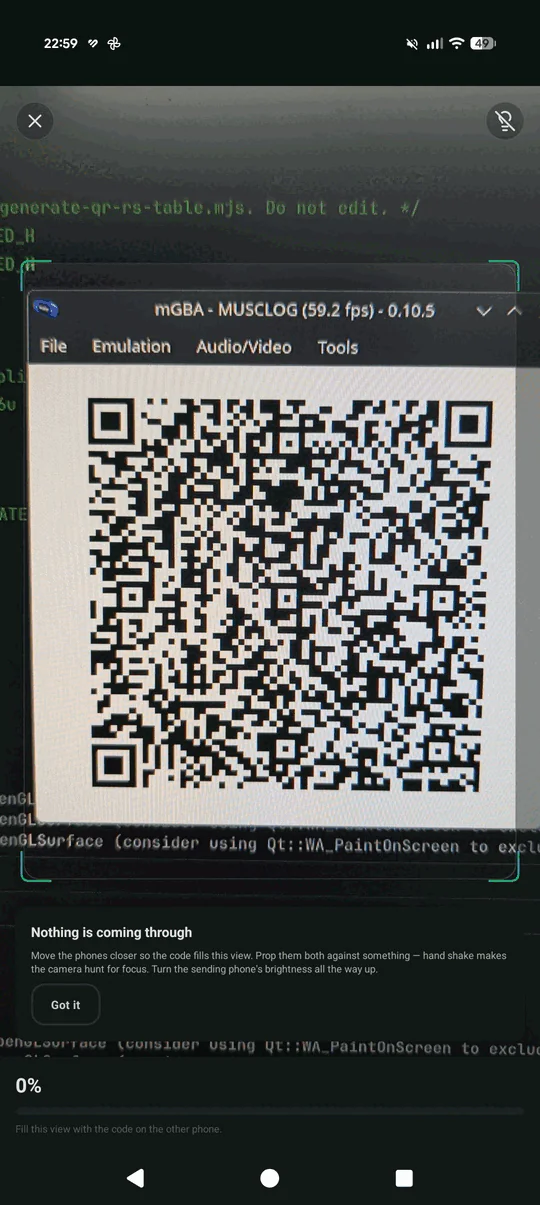
Caught at 0%, which is exactly the moment that hint card exists for. This is a real screen-to-camera link with no back-channel, so when nothing is arriving the only thing the app can do is tell you to fill the frame and hold still. It’s also mGBA rather than a cartridge — the ROM doesn’t care what’s drawing its pixels, so the emulator on the website beams a save just as happily as the real thing.
The pipeline is the same one the phones use, which is the point:
profile + SRAM stores + referenced ROM records
      ↓  compact JSON schema v1, streamed as bytes
      ↓  SHA-256
      ↓  MLOG container v1 (plain, uncompressed, database payload kind)
      ↓  LT fountain, 292-byte blocks, frozen 20-byte frame header
      ↓  base44 (468 alphanumeric characters per frame)
      ↓  QR version 11-L, mask 0, 61×61 modules at 2 Game Boy pixels/module
      ↓  phone scanner and the existing receiver
Every line of that was a problem.
The cartridge cannot hold its own save as a string. There’s no JSON library, and more importantly there’s nowhere to put the result — the Game Boy’s work RAM is measured in kilobytes and most of it is already spoken for. So optical_export.c never builds the payload. It renders it as a virtual byte stream — a function that walks the SRAM stores and emits bytes — and runs that same walk multiple times for different purposes. First pass measures the length and hashes it with SHA-256. Second pass computes the container checksum. Then it caches the first twelve finalized 292-byte blocks into the unused high end of SRAM bank 3, which is enough that a normal save is served entirely from cache and never re-streamed. The payload only has to be reproducible, never resident.
There’s no floating point, and the fountain code needs a logarithm. The frame format decides which source blocks to XOR together using a robust soliton distribution, and both devices have to derive the identical subset from a sequence number with no handshake at all — the phone might be running a version of the app from months later. On the phone that’s a deterministic dlog written specifically because Math.log is allowed to disagree between engines. GBDK has no floating-point runtime at all, so the C side is fixed point, and it deliberately skips sequence numbers that land on an ambiguous CDF boundary rather than risk disagreeing with the TypeScript by one block. Arbitrary gaps in the sequence are legal; a frame the two sides decode differently is not. There’s a test that pins the C encoder’s emitted frames against the app’s own constants, because “the bar fills to 98% and stops forever” is the failure mode here and it comes with no error message.
Exercise identity has to survive on two wires at once. A cartridge .sav stores a logged set’s exercise as a 0-based index into a frozen table, and the optical export sends that same index. So the table order in data/gameBoyOpticalProtocol.json can never change — not sorted, not regenerated from whatever the current “popular” 100 happen to be. Reordering it would silently re-point every existing save file and every past export at a different movement. On the receiving side the app maps the index back to the bundled catalogue’s stable slug, so an imported Game Boy workout arrives with its real name, photos and target muscles instead of a text stub. And an index past the end of the list means the cartridge is newer than the phone, which creates a plain user exercise rather than rejecting the transfer.
The QR rendering has its own set of indignities. QR version 11 is 61×61 modules, drawn at 2 pixels per module, which needs 324 background tiles — more than the 256 a single VRAM bank addresses, so the tile map has to keep the bank bit set in its attribute map across both CGB VRAM banks. Encoding runs with the CGB double-speed CPU switched on, each frame is held for at least 30 VBlanks so a phone camera can actually focus on it, and the whole QR workspace lives in that same transient bank-3 scratch region — carefully above the custom foods, which end at 0x0A2F, because overwriting somebody’s saved foods in order to display a QR code would be a genuinely spectacular bug.
What it cost in ROM
I ended the first post pleased with myself about having 1,504 free bytes in bank 0, after an era where I had 291.
Sharing ate three entire banks:
Bank layout: _CODE_10 uses 11488 / 16384 bytes   (sharing UI + QR encoder)
Bank layout: _CODE_11 uses 10296 / 16384 bytes   (streaming exporter + SHA-256)
Bank layout: _CODE_12 uses 4519 / 16384 bytes    (fountain encoder)
Which is fine — banks are cheap, the cartridge had already grown to 256 KB, and the linker map check fails the build the moment one overflows. What is not cheap is bank 0, because every one of those banked entry points needs a trampoline that lives in the always-mapped bank, and the SHA-256 and container code is called from three different places. Adding a feature that is architecturally “just one more screen” still taxes the one region you cannot page.
Nobody negotiates anything
The thing I keep turning over is that the cartridge and the phone never agree on anything, because they cannot.
There’s no handshake, no version exchange, no capability probe, no retry request, no acknowledgement that a transfer even happened. One device emits light in a format frozen months ago, and the other one reconstructs a database from it. Every single decision — block size, degree distribution, byte order, the exact order of the exercise table — had to be right the first time, because there is no channel over which to fix it later.
It is the least modern data transfer I have ever built, and it is the only one in the app that does not depend on a single third party. Those two facts are the same fact.
Sending one day instead of everything
SHARE DATA is a migration. It hands over the whole save, and the phone treats it the way it treats any full backup: it previews it, asks, and then replaces everything on the receiving device. That’s the right shape exactly once, when you’re moving in.
It is the wrong shape for the thing I actually kept doing, which was logging a day of food on the couch with the cartridge and then wanting it on my phone. Nobody wipes their phone to import a Tuesday.
So the nutrition screen’s Select menu has a second action, SHARE DAY. It sends only the day you’re looking at, and the phone merges it: it previews what’s coming, matches every food against what you already have, and adds the entries to that date in your diary. It only shows up when the day has something logged, because streaming QR codes at someone to transfer nothing is a poor use of both our time.
The cartridge side turned out to be almost free. Same streaming byte-walk, same container, same fountain, same QR encoder. Three things change: the reference scan stops at that one day, so only the foods it used get sent; the schema it renders is a much smaller one; and two bytes in the container header flip. Those two bytes are load-bearing — one marks the payload as a share rather than a database, and the other declares a version number so implausible that a copy of the app built before day sharing existed reads it, decides the sender is from the future, and refuses to offer its destructive restore. An old build can’t be taught anything, so the format had to be shaped so that the wrong thing was impossible rather than merely discouraged.
The hard part was food identity, and the reason is a 16-character buffer. When the cartridge loads a food out of ROM it copies the name into a buffer sized for exactly what fits the UI: sixteen characters and a terminator. Which means “Lettuce, leaf, green, raw” reaches your phone as Lettuce, leaf, g.
That’s fine when you’re replacing the whole database — nothing is there to conflict with. It is not fine when you’re merging into a phone that already has a food catalogue, because matching on a truncated name misses essentially every bundled food, and the punishment is a second, worse-named copy of it appearing every single time you share a day.
The fix was the exercise trick again, one layer down: send the index, not the name. The generator that builds the ROM’s food tables now also freezes each food’s identity into that same protocol file, so position 0 is permanently that lettuce, and the phone resolves the index back to the food it already seeded — real name, barcode, micronutrients and all. Your existing food gets reused instead of duplicated. A food you typed in on the cartridge has no bundled identity to look up, so it falls back to the truncated tuple, which is correct: it’s genuinely a new food.
Freezing that list has the same rule as the exercises, and the generator enforces it — regenerating the tables in a way that would change an existing position fails the build with a message about save files, rather than silently re-pointing every logged meal at a different food.
The cartridge does not know what time you ate. A food log entry is six bytes: day number, food index, grams. There’s no clock field and nowhere to put one. So every imported entry lands at midday, filed under “Other”, and the receiving screen says so in plain words — an entry arriving at 12:00 under a generic meal looks like the transfer lost something, and it’s better to admit the cartridge never knew than to invent a breakfast.
The last decision was the one I couldn’t make on your behalf. If the day you’re importing already has entries on the phone, adding to it double-counts everything, and replacing it throws away anything you typed there yourself. Both are things people genuinely want — re-scanning a day you already imported wants replace, adding your Game Boy lunch to a day you’d already logged breakfast on wants add. So the import refuses to guess: the receiving screen asks, and there is no default. Replacing is the only destructive thing any share in the app does, and it happens in the same database transaction as the insert, so it can’t half-succeed and leave you with an emptied day.
Conclusion
The cartridge is a gimmick. I have never pretended otherwise. But the thing that bothered me about it was not a gimmick at all: I had built a device that produced real data and then trapped it, and “your data is yours” is the entire premise of the app it is a port of. A save file nobody can read is not privacy, it’s just a slower kind of loss.
What fixed it was not new work, it was noticing that the work was already done. The optical transfer existed, it was already frozen and already shipped, and the only thing standing between a 1998 cartridge and a 2026 phone was somebody writing a QR encoder that fits in 16 KB. The format did not have to be extended by a single byte to accommodate the Game Boy — a fountain-coded frame does not care whether the screen showing it cost €40 or €1,200.
So: the battery in that cartridge will still die one day. But it will take nothing with it.
Every side of this is in github.com/blopa/musclog-app, and it is worth knowing which is which: the cartridge encoder is gameboy/src/features/optical/, the phone receiver is utils/optical/ and did not change by one line, and data/gameBoyOpticalProtocol.json is the frozen table both ends agree on without ever asking each other. You can also just try it at musclog.app/gameboy — point your phone at your monitor and watch a webpage hand a database to an app.
What’s next?
The obvious one is a camera on the other end.
Musclog on J2ME, or Symbian S60v3 — I’ve been joking about this for a while, but the joke now has a reason behind it. A 2006 Nokia has more RAM than the entire Game Boy has address space, it has a real filesystem, and it has a lens. Which means the transfer could finally go both ways instead of one device shouting into another: a Nokia N70 receiving a database from a Pixel, no cable, no account, no server, over a protocol neither manufacturer has heard of.
Before that, though, there’s a smaller thing I want to know, and I can’t answer it from an emulator. An original Game Boy Color screen is unlit, reflective, and ghosts like mad — and a 61×61 QR code drawn on it at two pixels per module is right at the edge of what a phone camera should be able to resolve off a surface like that. mGBA renders it perfectly, which proves nothing at all about a 27-year-old LCD in a badly lit room.
So if you flash this onto a real cartridge, tell me how the scan goes. That failure is the one thing the design cannot report: the Game Boy has no idea whether anybody is reading it. It just keeps flashing.
See you in the next one!
